Subscribe to the
Newsletter
The Human
Arman Hezarkhani has watched the word "agent" get stretched until it means nothing. "The word agent has been bastardized," he says. He's the CTO of Tenex, former Google, Carnegie Mellon CS—and he builds production agents for companies that need them to actually work.
His take: "An agent is a piece of software. A website is a type of software. An app is a type of software. An agent is a type of software." No magic. No sentience. Just code that loops.

01. Pull Back the Curtain
It's a while loop. Not a junior employee.
An agent is code that runs in a loop and has access to tools. That's the whole thing. The AI industry wants you to think agents are basically interns with GPUs—little digital employees making independent decisions—but they're not. They're while loops with API calls, and once you see that, half the marketing hype falls apart.
ChatGPT, Claude, Gemini on the web? Single-shot. You ask, they answer, they wait for your next message. An agent is that same brain wired into a loop that keeps going. It does something, checks the result, decides what to do next, and repeats until some condition tells it to stop. The mysticism around agents exists because it benefits the people selling you things. If agents sound like magic, you'll pay more for them. If they sound like code you could write yourself, maybe you just will.
Here's what the loop looks like:
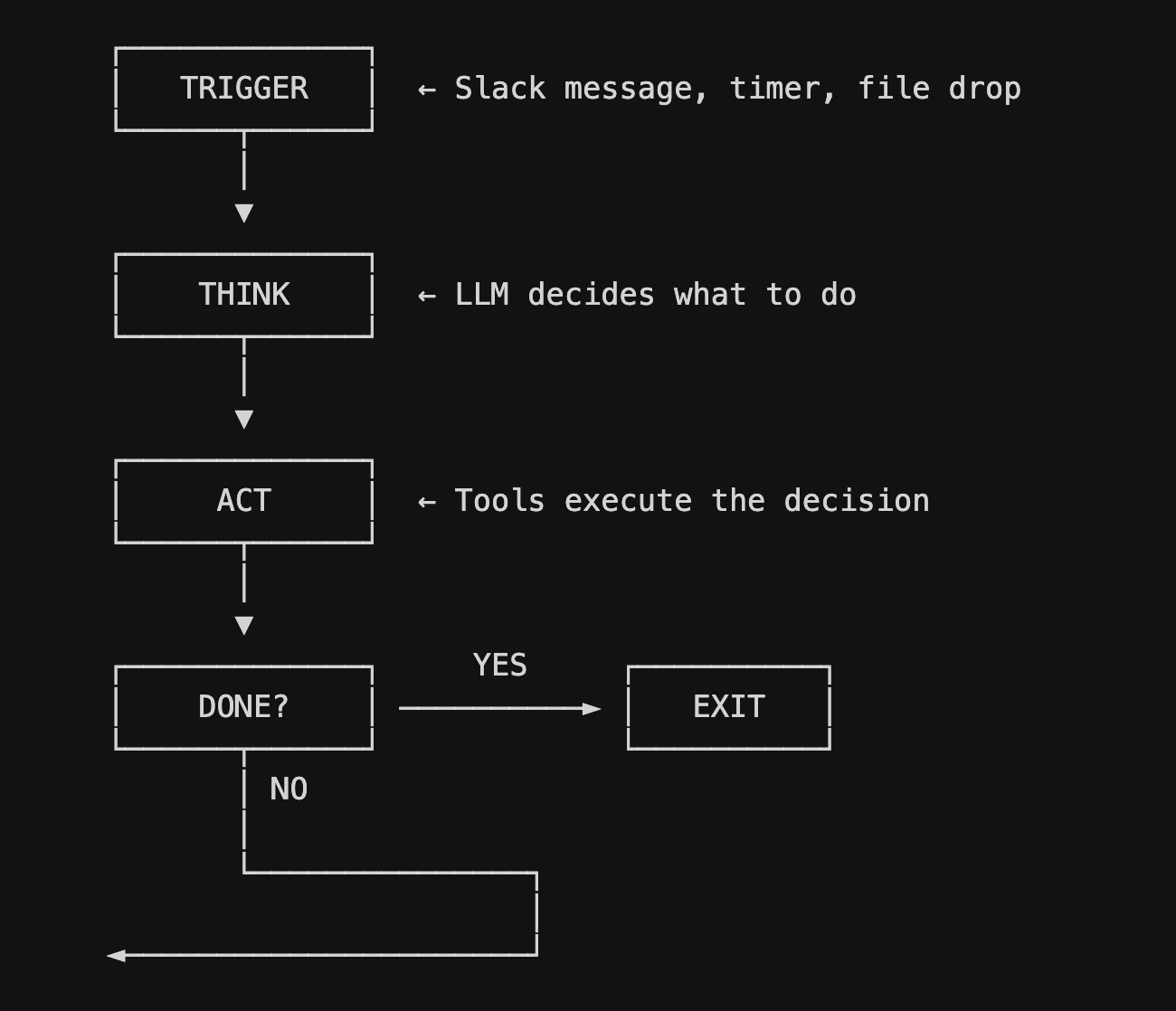
How do I know if something is really an agent?
Ask one question: does it keep working after you stop clicking? If yes, it's probably an agent. If it just sits there waiting for your next prompt, it's a chatbot with good marketing. Next time someone uses the word "autonomous," mentally replace it with "runs in a loop without you clicking anything." That's usually all they mean.
Checkpoint: You can explain to a skeptical engineer that an agent is a while loop with an LLM inside. No hand-waving.
02. Set Up Your Environment
The boring part that everything else depends on.
Your agent needs permission to talk to the AI. That permission comes in the form of an API key—basically a password that says "yeah, this person paid us." You get one from OpenAI or Anthropic (or both), store it safely, and load it into your code. Takes five minutes, and everything else depends on doing it right.
How do I get an API key?
OpenAI:
- Go to platform.openai.com
- Click your profile in the top right
- Click View API keys
- Click Create new secret key
- Copy it immediately—you won't see it again
Anthropic:
- Go to console.anthropic.com
- Click API Keys in the left sidebar
- Click Create Key
- Copy it immediately
Where do I put the API key?
Pick your path:
Cursor (What Arman Uses)
- Open Cursor
- Click File, then Open Folder
- Create a new folder called my-agent and open it
- Click File, then New File
- Name it .env and paste your key: OPENAI_API_KEY=sk-...
- Click File, then New File again
- Name it .gitignore
- Type .env on the first line and save
- Open terminal by clicking View, then Terminal
- Run: pip install openai python-dotenv requests
VS Code
- Open VS Code
- Click File, then Open Folder
- Create a new folder called my-agent and open it
- Click File, then New File
- Save as .env and paste your key: OPENAI_API_KEY=sk-...
- Click File, then New File again
- Save as .gitignore
- Type .env on the first line and save
- Open terminal by clicking Terminal, then New Terminal
- Run: pip install openai python-dotenv requests
Replit (No Install Required)
- Go to replit.com
- Click Create Repl
- Choose the Python template
- Click Secrets (the lock icon in the left sidebar)
- Click New Secret
- Enter OPENAI_API_KEY as the key
- Paste your API key as the value
- Click Add Secret
- Click the Packages tab
- Search and add: openai, python-dotenv, and requests
Never hardcode keys. Never commit .env to git.
Pro Tip: Create a .env.example file with placeholder values and commit that. Future you (and your teammates) will thank present you.
Checkpoint: You can run your script without authentication errors. Your .gitignore includes .env.
03. The 40-Line MVP
The part that actually loops.
This is where you write the actual agent. It's about 40 lines of Python, and most of it is just functions doing normal things—checking for emails, calling an API, posting to Slack. The magic part is the while loop at the bottom that ties it all together and keeps running.
Where do I write the code?
Cursor/VS Code
- In your my-agent folder, click File, then New File
- Save as agent.py
- Paste the code below
- Save with Cmd+S on Mac or Ctrl+S on Windows
Replit
- Click main.py in the file tree (left side)
- Delete any starter code
- Paste the code below
What does a basic AI agent look like?
Here's a minimal agent. It checks for new emails, summarizes them, and posts to Slack. Then it waits and does it again.
Run It
Cursor/VS Code
- Make sure terminal is open (click View, then Terminal)
- Type python agent.py
- Press Enter
- Watch it run
- Press Ctrl+C to stop
Replit
- Click the green Run button (top center)
- Watch the console output on the right
- Click Stop to kill it
That's an agent. ~40 lines of code. It runs forever (or until you stop it), checking for work, doing the work, then waiting.
No-Code Path: If Python still feels like too much, start with Make.com or n8n. Build the same logic—trigger, action, conditional—using drag-and-drop. You'll hit limitations eventually, but for basic automation this gets you 80% of the way without writing a single line.
Checkpoint: You have a running agent with the core loop structure: trigger, think, act, repeat.
"If I have too many tools on my waist belt, my pants are gonna fall down."
— Arman Hezarkhani
04. Load the Utility Belt
Like Batman's, but not as good for fighting crime.
The email agent from Step 03 has three tools: check email, summarize with an LLM, post to Slack. But real agents need more—they need to read files, write files, search the web, query databases, hit APIs. The trick is balance. Give an agent too many tools and it gets confused about which to use. Give it too many options and it freezes up like a deer in headlights. Less is more.
What counts as a "tool" for an AI agent?
A tool is just a function your agent can call. You write the function, describe what it does, and let the LLM decide when to use it. That's the whole pattern—validate input, do the thing, return the result. Claude Code and similar systems take this a step further by giving the LLM access to bash commands, which means the agent can run any command-line tool on your machine. If you can do it in a terminal, an agent can do it too.
What tools should I give my agent?
Data tools let your agent read files, query databases, and hit APIs. Communication tools let it send emails, post to Slack, and create tickets. Computation tools let it run Python, execute bash commands, and process files. External tools let it search the web, scrape pages, and call third-party services.
How do I add a new tool to my agent?
Let's add a web search tool to the email agent from Step 03. Here's exactly how to do it:
- Open your agent.py file
- Add this function anywhere before the run_agent() function:
- Now your agent can call web_search() whenever it needs to look something up
- To use it, update your run_agent() loop to call the tool when needed
That's the pattern. Write a function, make it return something useful, call it from your loop. Every tool follows the same structure.
Start with the tools you actually need. Don't build a tool library before you know what problems you're solving.
No-Code Path: Airtable or Notion databases can serve as lightweight memory stores. Use Zapier or Make to read/write context between runs. It's duct tape, but it works.
Checkpoint: Your agent has at least 3 tools it can use to take action in the world.
05. Light the Fuse
Something has to start the loop.
An agent without a trigger is just code sitting there. You need something to kick it off—a scheduled time, an incoming message, a file landing in a folder, or just you running it manually while you're building.
How do I make my agent run automatically?
Scheduled (runs every hour): Set up a scheduled task that runs your agent script at regular intervals.
Mac/Linux (cron)
- Open Terminal
- Type crontab -e and press Enter
- Add this line to run your agent every hour: 0 * * * * /usr/bin/python3 /path/to/your/agent.py
- Save and exit (in nano: Ctrl+X, then Y, then Enter)
- Your agent will now run at the top of every hour
Windows (Task Scheduler)
- Open Task Scheduler (search for it in Start menu)
- Click Create Basic Task
- Name it "My Agent" and click Next
- Select Daily and click Next
- Set start time and check Repeat task every 1 hour
- Select Start a program
- Browse to python.exe, add your agent.py path as argument
- Click Finish
Replit
- Click the three dots menu in your Repl
- Click Deployments
- Choose Scheduled deployment
- Set your cron schedule (e.g., 0 * * * * for hourly)
- Click Deploy
Event-based (runs when something happens): Set up a webhook—basically a URL that wakes your agent up when something pings it. A Slack message comes in, hits your webhook, your agent goes and handles it.
Manual (good for testing): Just run python agent.py in your terminal. The agent starts, does its thing, and you watch. This is how you should start—get it working manually before you automate anything.
The trigger is just the doorbell. The loop is what happens after you answer.
Pro Tip: Start with manual triggers during development, then automate once the agent works reliably.
Checkpoint: Your agent has a clear trigger mechanism that starts the loop.
"Treat it like a new hire on day one."
— Arman Hezarkhani
06. Send in the Sub-Agents
Because one loop isn't always enough.
Sometimes one agent isn't enough. Maybe you need to research five competitors, and doing it sequentially would take forever. Maybe one part of your workflow needs different tools than another. That's when you spawn sub-agents—smaller, focused loops that run in parallel and report back to a main agent that synthesizes their work.
When should I use multiple agents?
Think about how you'd manage a team. You don't research five competitors one at a time—you assign each to a different person and let them work in parallel. Sub-agents work the same way. The main agent hands out assignments, waits for results, then puts together the final output.
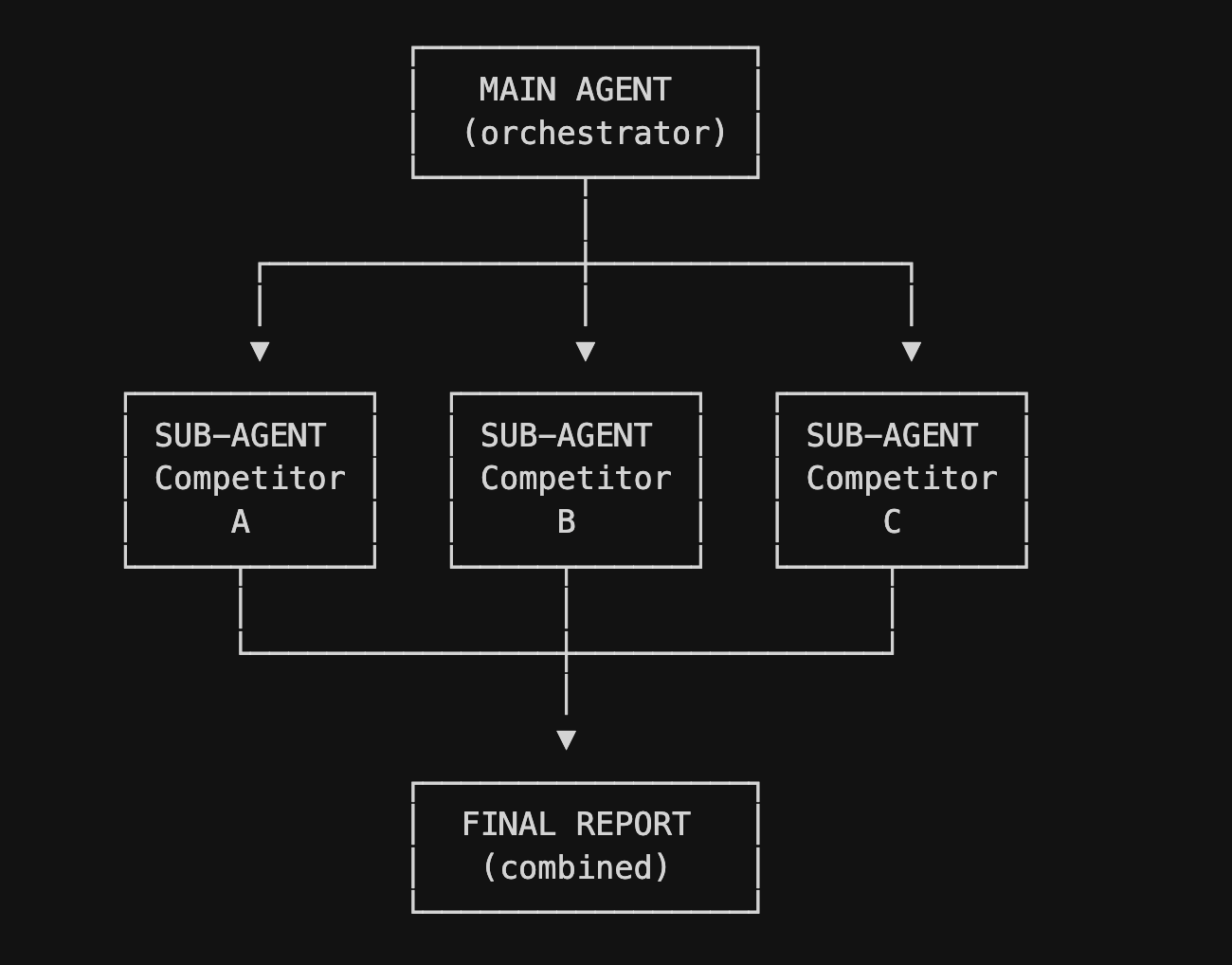
Spawn sub-agents when:
- The work can run in parallel without dependencies
- Different parts of the task need specialized tools
- You want to monitor or log different pieces separately
Don't spawn sub-agents when:
- Tasks need to happen in order
- The workflow is simple enough for one loop
- You're overengineering because it sounds cool
Nobody wants an AI bureaucracy. Keep it simple until simple stops working.
Checkpoint: You can identify one task in your workflow that would genuinely benefit from parallel agents—and you can explain why.
07. Build Guardrails
The bash tool giveth, and the bash tool taketh away.
Your agent will do exactly what you tell it to do—including things you didn't mean to allow. It won't question your instructions, it won't notice when something feels off, and it definitely won't stop itself from doing something stupid. That's your job. Guardrails are how you keep it from running off a cliff.
What guardrails should every agent have?
Output validation: Before your agent sends an email, posts to Slack, or writes to a database, check that the output makes sense. Block external email addresses if it should only contact internal people. Reject messages that are too long or contain banned words.
Rate limiting: Set a maximum number of API calls, emails sent, or files created per run. If your agent hits the limit, it stops. This protects you from runaway loops that burn through your API credits or spam your team.
Approval gates: For anything irreversible—deleting files, sending money, publishing content—require human approval before execution. The agent proposes the action, you say yes or no.
Logging: Write everything to a log file. Every decision, every action, every error. When something goes wrong (and it will), logs are how you figure out what happened.
How do I add guardrails to my agent?
Let's add rate limiting to the email agent from Step 03. Open your agent.py file and add two variables near the top: MAX_API_CALLS set to 100, and api_call_count set to 0. Then create a wrapper function called safe_llm_call that checks if you've hit the limit before making any API call.
If the count is at or above the max, it prints "Rate limit reached" and returns None instead of making the call. Otherwise it increments the counter and makes the call normally. Replace your direct API calls with this wrapper, and now your agent will stop itself before burning through your budget.
For approval gates, add a simple check before dangerous actions. Create a delete_file function that asks for confirmation before doing anything. It prompts the user to type YES to confirm, and if they type anything else, it cancels the deletion and returns without doing anything.
Start with rate limiting, add approval gates for anything scary, log everything
What can go wrong with an AI agent?
Your agent could email the wrong person, delete the wrong file, or run in an infinite loop burning through your API budget. It could confidently execute a task you never intended because your instructions were ambiguous. It could find a loophole in your guardrails and do exactly what you told it not to do, technically. The failure modes are creative.
Checkpoint: Your agent cannot delete files outside its sandbox, run dangerous commands, or execute high-stakes actions without approval. You've tested these failure cases.
FAQs
How much does it cost to run an AI agent?
Depends on how often it runs and how many tokens it processes. A simple agent checking emails every 5 minutes and summarizing them might cost $5-20/month in API calls. A complex agent doing research across dozens of sources could cost hundreds. Start small, monitor your usage, and optimize once you know what's expensive.
Can I build an AI agent without coding?
Yes, with limitations. Tools like Make.com, n8n, and Zapier let you build agent-like workflows with drag-and-drop. You can set up triggers, call LLM APIs, and chain actions together. You'll hit walls eventually—custom logic, complex error handling, specialized integrations—but for basic automation, no-code gets you surprisingly far.
What's the difference between an AI agent and an automation?
Blurry line. Traditional automation follows pre-defined paths—if this, then that. An agent uses an LLM to decide what to do next based on context. The agent might take different paths each time depending on what it sees. In practice, most useful "agents" are hybrids: structured workflows with LLM-powered decision points.
How do I know if my agent is working correctly?
Logs, tests, and staring at it like a nervous parent. Log every decision and action so you can trace what happened. Test with edge cases before you let it loose. Watch the first few runs manually to catch unexpected behavior. Set up alerts for failures. Don't assume it's working just because it didn't crash.
Should I use GPT-4, Claude, or something else?
For most agents, it doesn't matter as much as you'd think. GPT-4 and Claude are both capable enough for standard tasks. Pick based on cost, speed, and what APIs you're already using. The bigger decision is how you structure your prompts and tools—that matters more than which model you choose.
What if my agent makes a mistake?
It will. Plan for it. Use guardrails to prevent irreversible mistakes. Keep humans in the loop for high-stakes decisions. Make sure you can undo whatever the agent does. And when something goes wrong, check your logs, figure out what happened, and add a guardrail to prevent it next time.
The Takeaway
Here's what nobody in the AI industry wants to admit: most "agents" being sold right now are just chatbots with extra steps. Single-shot LLM calls wrapped in a pretty UI, maybe with some pre-programmed workflows that make it feel smarter than it is. The agents that actually work in production are simpler than the demos suggest—a scheduled task, a while loop, a few tools, some guardrails. Not glamorous. But they run.
You now know what an agent actually is. You know the pattern: trigger, think, act, repeat. You know how to set one up, how to give it tools, how to keep it from doing something stupid. You know enough now. The only thing left is actually building the damn thing.
Before building or buying any agent, ask:
- Does it actually loop, or is it single-shot with a UI?
- Can I see the retry logic and error handling?
- What triggers it?
- Can it spend unlimited money? Delete data? Message externals?
- Is there a kill switch?
- Are all actions logged?
Hire Us As Your Chief AI Officer
We have the muscle—and the reps. Want us to run this exact playbook inside your org? Talk to us today.
.jpg)
.jpg)
.png)
.png)

.avif)
-min-min.png)




.png)