Access

Build an AI Agent That Replaces 90% of Your Sales Team

By clicking submit, you agree to receive marketing emails, event reminders, and our flagship Ultrathink newsletter.
Thank you.
Oops! Something went wrong while submitting the form.

Build an AI Agent That Replaces 90% of Your Sales Team

How Vercel's GTM Engineering Director built a weekend project that saved $2M and turned a 20-person SDR team into 2.

Subscribe to the

ultrathink

Newsletter

By submitting this form, you agree to receive recurring marketing communications from Tenex at the email you provide. 
To opt out, click unsubscribe at the bottom of our emails.
Thank you.
Oops! Something went wrong while submitting the form.

The Human

One week to build. Five weeks to convince people it was good.

That's the ratio Drew Bredvick discovered after building Vercel's lead qualification agent—a system that took their SDR team from 20 people to 2 and saved the company $2M annually. For him, the techy work was the easy part. The hard part was proving to people that his weekend coding project could actually replace an entire function.

Drew Bredvick runs GTM Engineering at Vercel. Before that, he was a solutions engineer. And before that, a full-stack developer. The hybrid background means he knows what sales teams actually need + what's technically possible.

“I’m not kidding, the lead agent started as a shower idea,” Drew told us. After drying off, he sat down and coded the first version over the course of two days. His hunch is proof that sometimes you can just let ideas fly and see where they land. Taking the most of the repetitive qualification work of Vercel’s SDR team could be automated with the right prompts and the right data,” he thought. 

The agent now processes every inbound lead at Vercel—researching companies, scoring intent, routing the qualified ones to sales, handling the rest on its own. The humans who remain focus on edge cases and high-touch accounts, the work that still requires judgment.

As for the SDRs whose jobs the system absorbed? Bredvick is quick to note that no one was let go. They moved into other roles within the company. "They're doing way better," he says. 

The Loop

The framework Bredvick used isn't particularly novel. Shadow your best performer. Back-test against historical decisions. Iterate until the machine agrees with human judgment ninety-five percent of the time. Deploy it on live data without letting it take action. Then bring in the people whose jobs depend on it to help finish the build.

What makes the approach work is a principle borrowed from behavioral economics: revealed preference beats stated preference.

Americans say they want walkable cities. They live in suburbs and drive SUVs. Your sales reps will tell you they qualify leads based on company size and budget. Watch them actually work and you'll see something different—they're pattern-matching on dozens of subtle signals. The quality of a company's website. Its tech stack. How the prospect found you in the first place.

The agent has to learn what people do, not what they say they do. That's the difference between a demo and a system that actually ships.

Use Cases

Bredvick's playbook isn't universal. It works best when three conditions are met: a repeatable process with clear inputs and outputs, enough historical data to back-test against, and at least one high performer whose actual behavior you can study.

That describes a lot of companies right now. The GTM engineering lead building her first agent and terrified of a production disaster. The rev-ops team asked to scale inbound without hiring linearly. The founder at a fifty-person startup drowning in leads who can't justify a twenty-person SDR team. The engineering director who got the mandate to "add AI to sales" and has no idea where to start.

For all of them, the question isn't whether automation is coming to their sales process. It's whether they'll be the ones who build it or the ones who get replaced by it.

"Lead agent started small, just an idea I had in the shower, then I  sat down and coded over a weekend."
Drew Bredvick, Director GTM Engineering, Vercel

01. Shadow + Watch

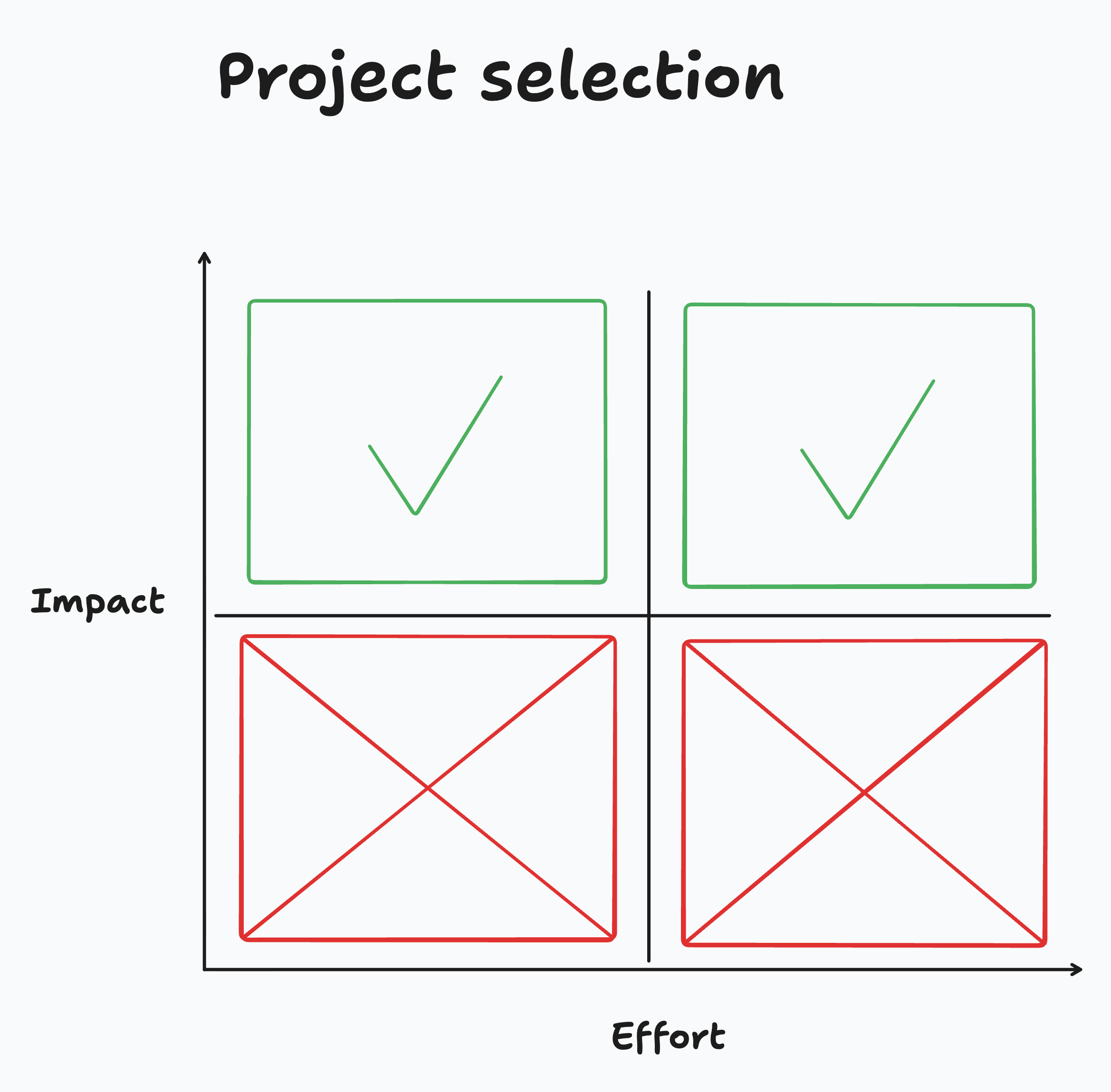
Pick a high-impact project regardless of effort. AI collapses the effort axis—what used to take months now takes a weekend.

Pull up a chair and a pen. 

Forget the process docs. Go sit next to your best SDR and watch them work for a full day. You're hunting for the gap between what they say they do and what they actually do. That gap is where the signal lives.

When Drew's team watched their top performers, they found the real qualification criteria had almost nothing to do with the official rubric. Reps were checking LinkedIn profiles, scanning websites for tech stack indicators, and pattern-matching on how leads found Vercel. None of it was documented.

Your job is half replicating the process, half encoding the judgment of your top performer. 

Pro Tip: Record screen shares with audio for the deepest level of nuance. You'll miss things in real time that become obvious on replay (think: the mouse movements and narration). Take notes on every decision—when they qualify a lead, write down every signal they checked. When they disqualify, same thing. You're building a truth table of inputs and outputs.

Checkpoint: 50+ documented decisions with the signals behind each one. You should know the job well enough to joke about replacing the whole team with yourself and a thousand subagents. (Half-joking.)

02. Pull Historical Data

You need a back-testing dataset. Drew pulled a Salesforce report of every contact form submission from the past 90 days—company info, contact info, how they found Vercel, what they asked for, and what happened next. Did they close? Ghost? Become a $500K whale?

Nothing fancy. Just a CSV with outcomes attached.

This is your ground truth. Every prompt iteration gets tested against it. And the edge cases matter most—the lead that looked terrible but converted, the one that checked every box but disappeared after the demo. That's where the agent learns nuance.

The mechanics:

  1. Pull the report. In Salesforce, all Contact Us submissions for 90 days. Include every field that might matter—you can ignore columns later.
  2. Attach outcomes. Join submission data with opportunity data. You need to know what happened: converted (with revenue and timeline), still in pipeline, disqualified, or ghosted.
  3. Export to CSV. You'll load this into your iteration environment next.

Pro Tip: Pull from multiple quarters if you can. Seasonality matters—patterns that hold in Q4 might vanish in Q1.

One warning: Your CRM is lying to you. Reps don't always log real disqualification reasons. "No budget" often means "I didn't want to work this lead." Cross-reference with emails and call recordings.

Checkpoint: Three months of leads with verified outcomes, exported as a CSV. In the next step, you'll load this directly into an agentic IDE like Cursor, Claude Code, or Windsurf—they can read CSVs and run prompts against them without you writing any code.

"I basically just iterated on the prompt and ran batches of them over and over again until my agent agreed with what happened in the field."
Drew

03. Prompt + Iterate

If you need prod data integration, you're building—not vibing. Lead agents live in the top half of this chart.

Drew opened Cursor, loaded his CSV of leads, and started asking the AI to evaluate them one by one. Look at this lead. Qualified or not? Compare to what actually happened. Wrong? Tweak the prompt. Run again. Hundreds of times.

This is your workbench—the place where prompt meets data + you find out if it's working.

Setting up:

  1. Open Cursor, Claude Code, or Windsurf. (Code editors with AI built in. You don't need to know how to code.)
  2. Drop your CSV into a new project.
  3. Start a conversation: "Look at this lead data. I'm going to give you a prompt to evaluate leads. Tell me if each one is qualified or not."
  4. Or Drew open-sourced the entire lead agent workflow. If you want to skip the blank-page problem—it takes about ten minutes—and use it as your starting point. Connect it to your CRM, swap in your qualification criteria, and iterate from there.

Human-Verified Prompt

You are evaluating an inbound sales lead for [COMPANY]. LEAD DATA: {lead_json} Before making your decision, reason through: 1. What signals suggest this is a high-intent buyer? 2. What signals suggest poor fit or low intent? 3. What's missing that would change your confidence? REASONING: [Your analysis] DECISION: [QUALIFIED / NOT QUALIFIED / NEEDS REVIEW] CONFIDENCE: [HIGH / MEDIUM / LOW]

Copy

Pro Tip: Force the agent to reason before it decides. This isn't just for debugging—it improves accuracy. Drew: "If you make it tell its reasons first, it's actually smarter. It's just the way math works." System 2 thinking for LLMs.

The grind:

Run the prompt against a batch. Compare the agent's calls to what actually happened—not what humans decided at the time, but whether the lead actually converted. Find disagreements. Fix the prompt. Repeat.

You're aiming for 95%+ agreement with historical outcomes. That's your bar.

Here's what Drew discovered along the way: the AI wants to please you. It's eager to qualify. "AI is eager to give us leads. It wants to make us happy. Most of the time we're just slapping the wrist of the agent saying no, that's a bad lead." Most of your prompt work will be adding constraints, not capabilities. You're teaching the agent to be pickier.

When things go wrong:

  • Agent too aggressive: Qualifying leads that never converted. Most common. Add more disqualification rules.
  • Agent too conservative: Rejecting leads that became big deals. You're over-indexing on shallow signals like company size.
  • Agent confused: Low confidence, inconsistent reasoning. You're asking for signals that aren't in the data.

Pro Tip: Track disagreements by category. If 80% of your errors are "agent too conservative on startups with weird domains," that's one prompt fix. If errors are randomly distributed, you have a data problem.

Drew's team kept seeing rejections for companies with sparse LinkedIn presence. Turned out those were often early-stage startups that converted at higher rates. The fix wasn't to ignore LinkedIn—it was to add context about the company stage.

When your prompt gets messy from edge cases, ask the AI to clean it up: "Help me reorganize this so it's clearer." When you hit a disagreement you can't fix with prompt tweaks, Drew suggests going back to shadow another rep—there could be a revealed preference you missed.

“I was getting buy-in and taking those metrics to the same leadership meeting every week, saying, ‘Look, this went well.’"
Drew

04. Run in Parallel + Prove It

Your prompt works on historical data. Now you need to prove it works live—and more importantly, prove it to the people whose sign-off you need.

Deploy the agent in passive mode: it processes every inbound lead alongside your human team, makes its own qualification decision, but takes no action. Humans still do the actual work. The agent watches, decides, and logs. You're not replacing anyone yet—you're building a paper trail of correct calls that skeptics can audit.

Here's the uncomfortable truth Drew discovered: the technical build took about a week, but earning organizational trust took five. The proving period will outlast the building period by a wide margin. Plan accordingly.

Setting up:

  • Connect your agent to production data. Zapier, Clay, n8n—whatever handles your contact form routing today.
  • Build a comparison dashboard. Agent decisions vs. human decisions, updated in real time.
  • Schedule a weekly leadership meeting. Same time, same room, same slide deck refreshed with new numbers.

Drew brought identical metrics every week: agreement rate between agent and humans, touch points per lead (dropped from 8 to 4), and efficiency gain as a percentage. A data analyst on his team dug into the shadow data and surfaced the 100% efficiency improvement that made the case undeniable.

The dashboard is for the skeptics who need to watch the system work before they'll trust it. Abstract numbers don't build confidence—a live feed of correct decisions does.

What to track:

  • Agreement rate: Agent vs. human decisions.
  • Accuracy rate: Agent vs. actual outcomes. 
  • Processing time: Lead received → decision made.
  • Confidence distribution: How often the agent is certain vs. uncertain.
  • Error log: When it got it wrong, and why.

Pro Tip: Include an "agent got it wrong" section in every review. Counterintuitively, showing your failures builds more trust than hiding them. It signals you're measuring honestly.

Build in explainability from the start. For any decision, a stakeholder should be able to click through + see exactly what data the agent considered and how it reasoned. Black boxes don't get deployed.

Checkpoint: You've run five weeks of parallel operation with weekly leadership reviews (it can be more or less, depending on your org). The dashboard is live with stakeholder access, agreement rates have stabilized, and efficiency gains are documented.

"The reason it worked is because I went to the people I had relationships with and ultimately got them to contribute to the vision as well."
Drew


05. Get the Co-Sign

You've been running in parallel for weeks. Leadership has seen the dashboard in your weekly meetings, and the efficiency numbers are real and documented. Now you need to convert that exposure into ownership—and the fastest way to kill resistance is shared authorship.

Drew started with ICs on the ground, the people actually doing the work, and got them to validate that the agent was making good calls. Then he "partnered very, very closely with the functional leader" for the SDR team, someone who would lean into AI initiatives rather than block them. That partnership was the unlock—getting something the functional leader co-signed, Drew says, "was really big for getting the full exec thumbs up."

But co-signing isn't enough. You want stakeholders to feel like they built part of this. Let the sales director tweak qualification criteria. Let marketing adjust the scoring weights. Let ops define the routing rules. Present the 80% version and ask for input rather than presenting a finished product and asking for approval.

The technical conversation + the organizational conversation require different languages. With engineers, talk architecture and edge cases. With sales leaders, talk pipeline quality and rep time saved. With finance, talk CAC reduction and headcount leverage. Same agent, different story depending on who's listening.

Pro Tip: Get your functional leaders hands-on with prototyping tools like v0. Drew's partner was "constantly generating v0 prototypes of ideas"—when leadership builds alongside you, they stop being gatekeepers and start being advocates.

Checkpoint: You have written sign-off from sales leadership, marketing leadership, and ops. Not verbal—documented.

"We basically built a system and gave them the controller. So she's having more fun too."
— Drew

06. Hand Them the Controller

Now flip the switch—but keep humans in the loop.

Lead qualification is a Type 1 agent: efficiency. Humans were already paid to do this work, so keep them in the loop. Type 2 agents—those that unlock new value—can operate autonomously.

Drew's principle is simple: if you're building an efficiency agent, one that automates work humans were already paid to do, you keep humans in the loop. The agent processes every lead, makes a qualification decision, and even drafts the response email. 

But a person still reviews before anything goes out. The system recommends; humans decide. And if they disagree? "You can disagree with that and work this lead anyway," Drew noted. The override is a feature, not a bug.

Drew's team went from 20 SDRs to 2. Those two now handle the genuinely ambiguous cases—the leads that even the agent isn't confident about. They're not doing less important work; they're doing the most important work, the judgment calls that actually require a human brain. And they're not burned out from processing hundreds of obvious disqualifications every day.

The feedback loop matters. "Our error rate in the beginning was higher," Drew explained, "but over time, as we've continually iterated on this with feedback from that SDR, it's gotten better and better." Every override is a training signal. Every disagreement is a prompt refinement waiting to happen. Build a monthly review to check agreement rates against the previous month and investigate any drift.

Pro Tip: The people who remain will be anxious about job security. Be direct about the new role. "You're here for the hard cases" is a compliment, not a consolation prize.

Checkpoint: The agent is processing 100% of inbound with human override capability. Override rate is under 5% after 30 days.


FAQs

What's the minimum data needed to start?

Three months of leads with outcomes. Less than that and you're guessing. If you don't have outcome data attached to leads, spend a week enriching your CRM before you write any code.

Can I use an off-the-shelf tool instead of building custom?

For lead qualification specifically, there are tools that work. But they're trained on generic patterns, not your patterns. Drew's agent works because it encodes Vercel-specific signals—their ICP, their tech stack indicators, their buyer journey. Generic tools miss the revealed preferences that drive 80% of accuracy.

What model should I use?

Claude or GPT-4 class for the reasoning work. You can use faster, cheaper models for simple enrichment tasks (pulling company data, checking LinkedIn). Drew's team uses a mix depending on the complexity of the decision.

How do I handle leads that need human judgment by definition?

Route them. Not every lead should be auto-processed. Enterprise accounts over a certain size, strategic partnerships, existing customer expansions—define these categories upfront and route them directly to humans. The agent handles volume; humans handle complexity.

What if my sales team resists?

The five weeks Drew spent convincing wasn't wasted. Resistance usually comes from fear (job loss) or skepticism (it won't work). Address both directly. Show the data. Make them co-builders. And be honest about what happens to headcount—vague reassurances create more anxiety than direct answers.

The Takeaway

The $2M savings and 32X ROI are real numbers from a real company. But the uncomfortable part is what Drew didn't say explicitly: once you prove an agent can do 90% of a job, the question becomes what other jobs are 90% automatable.

SDR qualification was the starting point because the data was clean and the process was repeatable. But the same loop—shadow, back-test, iterate, shadow mode, co-build—works for any function where humans make pattern-matched decisions on structured data.

  • Customer support triage 
  • Contract review
  • Expense approvals
  • Code review
  • Content moderation
  • The list is long

An agent is just a model, a prompt, and some tools. It's not hard. What's hard is having the organizational courage to deploy it.

Build Your AI Engine

Tenex helps companies architect, staff, and ship AI systems that actually move the P&L—not just the hype cycle.

If you're ready to build agents like Drew did, we can help you identify the right starting point, avoid the common pitfalls, and compress the timeline from months to weeks.

Get started →

Built by builders, trusted by leaders

Stay on the right side 
of history.

Get Started