How to Build + Execute an AI Strategy That Doesn’t Suck in 6 Steps
Have to figure out your AI strategy by… yesterday? This is the exact playbook Tenex uses to create and execute AI roadmaps for high-growth startups and enterprises valued at $50 billion and beyond.
0 of 7 steps
0 / 70 pts
The Playbook
Start here
Meet the Human Behind the Playbook
10 pts
The Human
Every executive is shaking in their boots right now—and for good reason. They feel the pressure (from their team, board, customers) to have an AI strategy and roll it out across their business.
It’s FOMO. They know that if they don’t figure out how to leverage AI, they risk irrelevancy.
We know damn well that using AI in your biz feels like eating an elephant. Sometimes you don’t know where to bite first (any tusk people?).
Alex Lieberman and Arman Hezarkhani have helped hundreds of companies architect enterprise-wide AI roadmaps that don’t try to boil the ocean, but instead gradually diffuse the technology across the business.
Together, at Tenex, they’verun hundreds of AI auditsacross media, real estate, SaaS, and deep tech—and seen the same pattern play out over and over again.
“Two things keep companies from unlocking money with AI: not starting small and not being creative about possible use cases.” — Alex Managing Partner, Tenex
Work through each action, then mark the step complete.
Step 1
01: Exec Buy-In
10 pts
Or bust.
If nothing happens, and everyone blames you later.
Find Your Internal AI Fangirl
You need someone with political capital, credibility, and the authority to rally teams. Nine times out of ten, that’s an exec.
Why? New hires rarely have enough trust or context, and mid-level operators usually hit walls without real air cover. But through your survey (next step), you may spot unexpected rising stars with social currency who can help power the effort from the ground up.
Pro Tip: A smart way to generate sponsorship is to show a win before asking for one. Spin up a scrappy pilot—like giving the customer service team a custom GPT chatbot trained on refund policies. Then, do a pre-post on monthly refund handouts. We’ve seen this move alone save companies millions.
The Boss and the Bulldozer
Another way of looking at it is:
The Boss = the decider.
The Bulldozer = the unblocker.
If these aren’t the same person, your AI champion must have direct access to both.
There’s Levels to It
Before anyone starts pitching moonshot AI ideas, you need the org aligned on how AI adoption actually works. Show them these phases:
Single-player tools: Give people off-the-shelf AI tools (ChatGPT for teams, Cursor for engineers). Train them and give them the best models.
Single-player processes: In AR, someone is turning bills into invoices, sending them out, then chasing payments. Automate this + save a week's worth of time.
Multiplayer, single-function process: Same idea, bigger lane. Take a workflow inside one function (e.g., the SDR-to-AE pipeline) + rebuild it end-to-end with AI.
Pro Tip: Don’t touch multiplayer, multifunction processes until phases 1–3 are nailed.
Two Cultural Enemies to Slay Early
• Fear of being replaced • Disillusionment from bad AI tools
As Alex puts it: “People who've tried AI before unsuccessfully always say, ‘This doesn’t work… it takes more time than doing it manually.’ You need someone to see something that actually works to believe again.”
Work through each action, then mark the step complete.
Step 2
02: Make the Company Confess
10 pts
Time to problem mine.
Employees don’t always tell managers what’s broken—but they will tell a survey.
Make sure to target tenured ICs, mid-level managers, and other operators—and aim for around 30 responses (depending on org size).
Key Survey Questions:
Q: How long have you been here?
Use: Weeding out the people with low social currency and power.
Q: List your weekly tasks.
Use: Some tasks just aren’t worthy of people’s time in the age of AI.
Q: What’s your most inefficient and time-consuming task? Explain.
Use: Opens the doors to ask about previous attempts at making the task more efficient.
“Culture change starts with experimentation, so ask people what they’re doing with AI and amplify it.” — Alex Managing Partner, Tenex
Work through each action, then mark the step complete.
Step 3
03: Interrogate People
10 pts
Respectfully.
Interviews reveal what’s broken, what’s working, and where AI can create leverage. Interview 6–12 people for 30 minutes each.
½ Execs = understand business priorities, talent mix, org dynamics
½ Operators = hand-picked rank-and-file employees from the survey
How to Run a Perfect Stakeholder Interview:
1. Ask the right questions
Arman asks the same questions every time (and personalizes them based on the surveys).
What do you do?
What are you excited about with AI?
What are you skeptical about with AI?
Pro Tip: People reveal more when you show you actually paid attention. If they flagged “report building sucks” in the survey, go deeper. “You mentioned reporting takes forever—walk me through the exact steps. How many hours a week? Who else touches it? What breaks?”
2. Transcribe everything
We use Notion AI Meeting Notes for this, but you can use any meeting note-taking tool of choice. Clean transcripts will lead to better recommendation quality later with Claude Code.
3. Nudge people to give more information
Bad answer:
“I spend a lot of time chasing customers.”
Good push:
“How many hours? Which tool? What triggers follow-ups? Where do things stall? Walk me through one example from this week.”
4. During each interview, quantify:
Frequency
Time spent
Cost of the time
Impact (P&L and strategic importance)
Effort to fix
Work through each action, then mark the step complete.
Step 4
04: Perform a Data Exorcism
10 pts
Claude is hungry for your chaos.
How We Synthesize Data with AI:
Download VS Code or Cursor (two Integrated Development Environments)
You are an expert operations consultant.
Read the files in this folder.
Produce a file called survey-recs.md with 8–12 recommendations.
For each recommendation, include:
- Title (one line)- Short description (2–3 sentences)
- Who benefits (roles/teams)
- Estimated investment (low/med/high with rough week estimate)
- Estimated ROI or hours saved per month
- Lift (1–5)- Dependencies and blockers
- Evidence (1–2 direct employee quotes that support this recommendation)
Rank by ROI per month/lift score.
Format as both a CSV and a markdown summary.
Pro Tip: Don’t one-shot it. Run this prompt multiple times. Layer in more research and dive deeper each time.
Work through each action, then mark the step complete.
Step 5
05: Build a Roadmap
10 pts
Show your work.
You can flip the data Claude just gave you into table, board, and timeline views, and with the Notion MCP. Claude Code writes right into it. So when we say, “Hey Claude, turn all of this work into a pretty-looking visual,” it will start building out a cracked-out Notion Database.
For Non-Technical Folks, Here’s Exactly What to Do:
1. Make sure you have Notion Sign in (or create an account) and open a new page.
2. Create a database Add a Table—this is where your AI projects will live.
3. Add the Notion MCP In your IDE (Cursor or VS Code), install the Notion MCP and connect your Notion workspace via API key.
4. Once connected, tell Claude what to build Paste your outputs and run the prompt below to structure the work inside Notion.
Human-Verified Prompt:
I want to create a Notion Database to track AI projects. Please suggest columns such as:
Title, Description, Owner, Start Date, End Date, Investment, ROI, Lift, Status, Dependencies, and SME approval.
Once your recommendations are in the DB, ask Claude to help space things out:
Please generate a 12-month timeline for these projects. Prioritize high ROI and low lift tasks first. Account for resource limits and team availability. Then feed the final DB export back to Claude and ask:
Read the Notion DB export. Write the remainder of the report. Include: abstract, company background, goals, key quotes, prioritized use cases, solution descriptions, and a conclusion.
Work through each action, then mark the step complete.
Step 6
06: The Cycle of Execution
10 pts
Build the least that delivers the most.
Execution isn’t about adding AI everywhere—it’s about applying intelligence exactly where it unblocks the workflow. Once you’ve got a roadmap, you need to decide how to actually build your first item.
Agentic Workflows > Agents
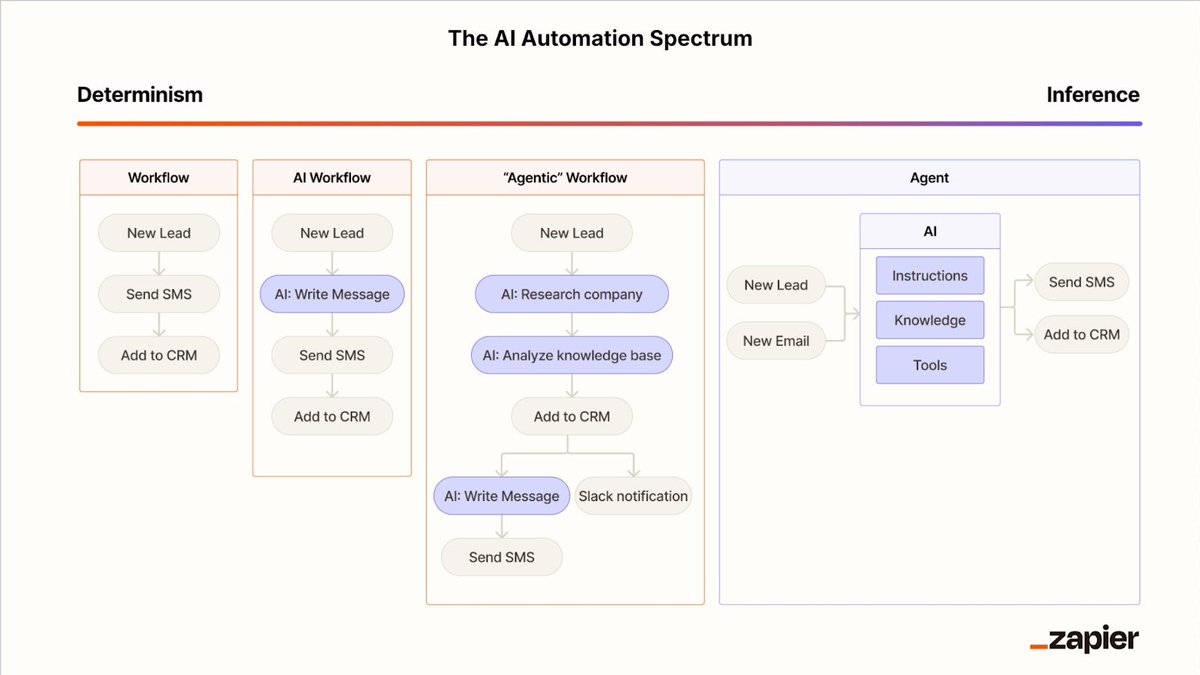
The biggest mistake execs make is leaping straight into AI-powered “agents” without understanding how workflows actually behave under load. Most processes aren’t agent-driven or fully automated—they’re hybrids with a deterministic spine and a couple of intelligent steps layered in.
“If you can make an ‘if this happens, do this’ statement, it’s deterministic,” Alex says. "That's the far left of this spectrum. If you can mentally model it like a junior employee… it’s an agent,” Arman adds. That's the far right of the spectrum.
The sweet spot, as Wade Foster (CEO of Zapier) puts it, is an "agentic workflow"—a process with a few smart steps that apply reasoning, while the rest runs on rails.
Long-running agents with no human or deterministic checks in between tend to compound errors, so build in checkpoints every few steps to keep the system from drifting. For example, if an agent was running for 30 hours, and made a mistake, that 1% gets multiplied, and by the end of the project, that small error could veer way off from accurate or your intended direction.
How to Break Workflows Into Micro-Steps (and Pick the Right One to Automate)
Break every workflow on your roadmap into 5–15 micro-steps, then find the most repetitive, time-expensive one. That’s your AI insertion point—not the whole workflow and not the glamorous step leadership is excited about. Tight, surgical wins build momentum and give operators a clear sense of progress.
Should I Build or Buy AI Software?
“Traditionally, build versus buy was simple… now the cost of building software is plummeting. But, your knee-jerk reaction should still be to buy,” Arman says.
Buy when the step is generic or velocity matters; build when the workflow is deeply custom or you can tightly constrain the agent like a junior employee. Cheap to build doesn’t mean cheap to maintain—your engineering team will thank you for choosing wisely. Use custom builds only where they create differentiation or strategic leverage.
How Much AI is Too Much AI?
AI shines at turning unstructured chaos into structured clarity—not doing your math homework. Keep sensitive or high-accuracy steps inside software, and surround them with intelligent steps that accelerate everything else.
We’ll Be Your AI Strategy
We have the muscle—and the reps. Want us to run this exact playbook (with military-level precision) inside your org? Talk to us today.
Work through each action, then mark the step complete.
Playbook complete.
You've implemented every step. Want this running inside your company with our team in the room?