How to Test Your AI Before It Embarrasses You: 5-Stage Framework for Evaluating Agents + LLMs
How Gauntlet's CTO built a 5-stage AI evaluation framework that turns vibe-coded demos into enterprise-grade systems—and open-sourced the whole thing.
0 of 6 steps
0 / 60 pts
The Playbook
Start here
Meet the Human Behind the Playbook
10 pts
The Human
Ash Tilawat has a reputation for turning messy AI systems into something you can actually ship. As Gauntlet AI's CTO, he’s trained 1,000+ engineers through a program the community cares about for a simple reason: graduates don’t leave with better demos—they leave with production systems.
The spine of that program is his evaluation framework, and he just open-sourced the whole thing: notebooks, schemas, config templates, the guts.
“Nobody cares if your demo works once,” he said. “Is it actually moving the needle in terms of ROI for the business?”
He built the framework after seeing the same failure loop repeat: teams rush to automate judgment before they’ve earned any ground truth. His fix is actually slightlyinconvenient—humans stay in the loop longer than people want, at the exact points where bad assumptions get locked in.
Then you automate, but only after you’ve taught the system what “good” means. The uncomfortable part: if you don’t have someone willing to own that judgment, you don’t really have an eval strategy—you have a scale strategy for being wrong.
"If you think about a world where all these agents become so good they can build whatever you want, then what is your moat? Your moat is any data specific to you, or it's your eval set that makes your system way more reliable than anybody else." — Ash, CTO of Gauntlet AI
Work through each action, then mark the step complete.
Step 1
Build Your Golden Set
10 pts
Everyone fast-forwards past this part. Don't.
A golden set is 30-50 test cases (the specific inputs you throw at your AI and the outputs you expect back) that you, your product manager, and your subject matter experts agree represent the most important requests your system should handle. Not the edge cases yet. The core functionality. The things that, if they break, mean the whole system is useless.
Each test case is more than an input-output pair. It includes constraints: the expected tools that should be called, the sources that should be retrieved, keywords that must appear, and keywords that should never appear. You're building a truth table of what "correct" looks like for your system.
Here's a YAML template for structuring your golden set:
# golden_set.yaml
test_cases:
- id: "gs_001"
query: "What is our remote work policy?"
expected_tools: ["vector_search"]
expected_sources: ["remote_work_policy.md"]
must_contain:
- "15 days"
- "annual increase"
must_not_contain:
- "unlimited"
- "no restrictions"
category: "hr_policy"
priority: "critical"
- id: "gs_002"
query: "Show me Q4 revenue by region"
expected_tools: ["sql_query"]
expected_sources: ["transactions_table", "regions_table"]
must_contain:
- "North America"
- "EMEA"
must_not_contain:
- "projected" # Should be actuals only
category: "financial"
priority: "critical"
People always ask if they need an LLM to judge the outputs right away. They don't. "You need to be in the weeds of your AI system," Ash says. "Your product managers should be the ones checking things off. You as the AI engineer should be the ones checking things off."
The point of stage one is human annotation. Slow, tedious, manual human annotation. You're building the ground truth that everything else gets calibrated against.
Pro Tip: Run your golden set before every deployment, not after. This is your smoke test. If the golden set passes and something still breaks in production, that's a signal to add new cases.
Checkpoint: You have 30+ test cases with explicit constraints documented. A product manager could run through them and check pass/fail without asking you questions.
"There's only three things you can do. Update a prompt, update a tool call, update the descriptor associated with the tool, or change the model itself. That's it. When I talk about iteration, it's always going to be one of those three things." — Ash
Work through each action, then mark the step complete.
Step 2
Test the Weird Stuff
10 pts
Your core test cases catch the common requests. Labeled scenarios catch everything else.
Core tests are tightly coupled to the most common requests. That's intentional. You want the core functionality locked down. But if your system only handles those well, it will crumble the moment a user phrases something differently or asks about an edge case.
Labeled scenarios expand your test coverage by category. If you have a travel agent that books hotels, flights, and rental cars, you create labeled scenarios for each category, including the weird cases. The user who wants a hotel but not near any airports. The flight that requires a visa the user doesn't have. The rental car pickup at 3am.
The key difference is annotation depth. Every labeled scenario gets tagged with:
Category: What domain is this? (HR, financial, engineering, etc.)
Tool expectation: Which tools should be used?
Failure mode: If this fails, what category of failure is it? (wrong tool, wrong source, hallucination, etc.)
Priority: Is this a blocking issue or a nice-to-have fix?
"The entire point of an eval system is having a human continuously create scenarios and tests and make them run," Ash says. "And the answer is yes. Your expert, your product manager, your engineer is going to hate you a little bit. But the result is something that is so much more robust."
You can use an LLM to help generate scenario variations. Take one well-annotated case and ask it to create 10 variations with different phrasings or edge conditions. But a human still needs to validate and annotate those generated cases. The LLM is a force multiplier, not a replacement.
Pro Tip: Track coverage gaps explicitly. If you have a 4x4 matrix of categories and tools, you should be able to see at a glance which combinations have thin coverage. Those gaps are where production failures hide.
Checkpoint: You have scenarios across all major categories your system handles. Each scenario is annotated with expected tool usage, sources, and failure mode. You can generate a coverage report showing where gaps exist.
"People always think evals need to start off with everything being LLM-as-judge. I disagree. You need to be in the weeds of your AI system." — Ash
Work through each action, then mark the step complete.
Step 3
Build Your Replay Harness
10 pts
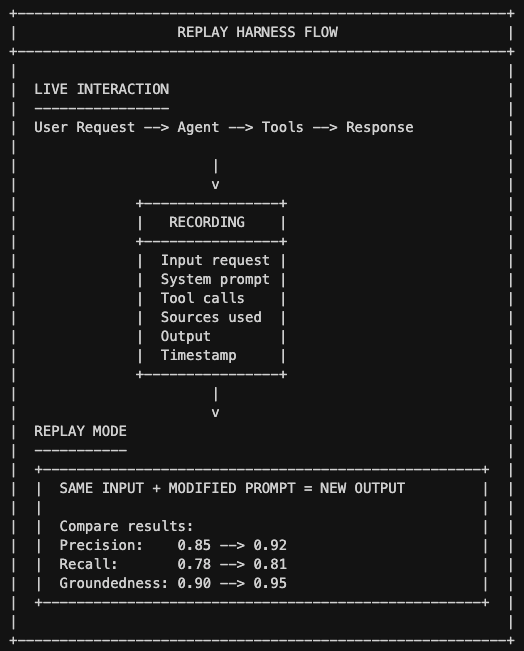
A replay harness is a recording system that lets you re-run tests without burning API calls.
You've built up a library of test cases. Running all of them against your live system every time is expensive, slow, and introduces variance. The same request might get slightly different results due to model temperature or API latency.
A replay harness solves this by recording interactions and letting you replay them with modified configurations. You cache the exact state of a failed interaction (the input, the system prompts, the tool calls, the sources retrieved) and then tweak the prompt to see if the output improves without calling the API again.
"What a replay harness does is it records that input-output pair," Ash explains. "It saves that exact tool call set, the sources that were used, the input values, the system prompts. It allows you to replay it using a cached prompt so that you can change aspects of the prompt and see if it would function much better."
This is where you start getting numeric scores instead of just pass/fail. For retrieval systems, track precision (of the vectors retrieved, how many were relevant?) and recall (of all relevant vectors, how many did we retrieve?). For agents, track tool call accuracy. Did it call the right tool at the right time?
Ash's recommendation: pick two or three metrics to start. Don't try to track everything.
For RAG systems: Precision and recall on retrieval
For agents: Tool call eval (right tool, right time) and end-to-end completion
For generation: Groundedness and faithfulness
Pro Tip: Use replay to test prompt changes in isolation. Want to see if adding "think step by step" actually improves accuracy? Replay 100 cached interactions with and without that change. The data will tell you.
Checkpoint: You can record any live interaction and replay it with modified prompts. You have numeric scores for at least two metrics. A product manager can replay a failed interaction and experiment with prompt changes without engineering help.
"When you reach that point in calibration where the grade the human gives equals the grade the AI gives, then you can automate the entire system." — Ash
Work through each action, then mark the step complete.
Step 4
Create Your Rubric
10 pts
Calibrate the LLM to judge like your best human reviewer.
A rubric is a structured scoring system (accuracy, completeness, groundedness, tone) that an LLM can apply consistently. The key insight most people miss: you don't just write a rubric and hand it to the LLM. You calibrate the LLM-as-judge against human judgment first.
The calibration process is iterative. Run a batch of 50-100 examples through both human and LLM scoring, find where they disagree, and figure out why. Sometimes the rubric wording is ambiguous. Sometimes the LLM is too lenient or too harsh. Adjust and re-run until LLM scores match human scores consistently.
Once calibrated, the LLM can score thousands of interactions. But you still bring the human back periodically to check for drift. Models change. Usage patterns change. What was calibrated in January might be miscalibrated by March.
Pro Tip: Include concrete examples at each score level in your rubric. "Accurate" is vague. "Every claim is traceable to source documents" is specific. The more specific your rubric, the better the LLM calibrates.
Checkpoint: You have a rubric with 3-5 criteria, each with clear definitions and examples. LLM-as-judge scores match human scores within 0.5 points on average across a 100-example calibration set.
"Your goal is LLM-as-judge, trained to be as good as the SME." — Ash
Work through each action, then mark the step complete.
Step 5
Run Experiments
10 pts
A/B test your configurations. May the Best Stack Win
You have the infrastructure to evaluate at scale. Now you can start systematically testing different configurations against each other.
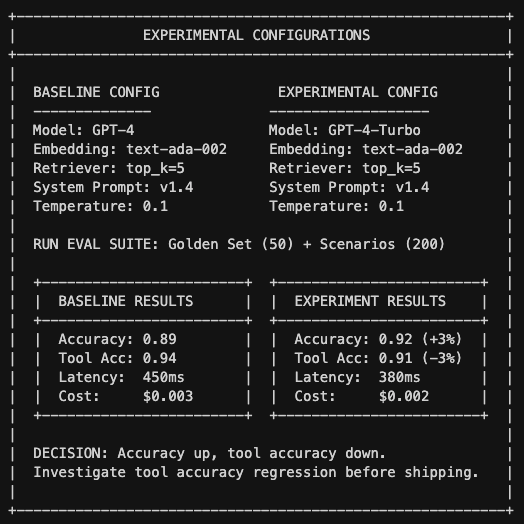
An "enterprise configuration" is the full stack of choices that define your system: which model, which embedding function, which retriever settings, which prompts, which tools. When a new model drops or you want to test a prompt change, you create a new configuration and run your eval suite against both.
# experiment_log.yaml
experiments:
- id: "exp_20260123_001"
name: "GPT-4 vs GPT-4-Turbo model swap"
hypothesis: "Turbo improves latency without sacrificing accuracy"
created: "2026-01-23"
status: "completed" # pending | running | completed | abandoned
baseline:
config_version: "prod_v1.4"
model: "gpt-4-0125-preview"
system_prompt: "prompts/v1.4.txt"
temperature: 0.1
embedding_model: "text-ada-002"
retriever_top_k: 5
variant:
config_version: "exp_v1.4.1"
model: "gpt-4-turbo-2026-01-01"
system_prompt: "prompts/v1.4.txt" # Same - one change at a time
temperature: 0.1
embedding_model: "text-ada-002"
retriever_top_k: 5
eval_suite:
golden_set: 50
labeled_scenarios: 200
edge_cases: 75
total_cases: 325
results:
baseline:
accuracy: 0.89
tool_accuracy: 0.94
groundedness: 0.91
latency_p50_ms: 450
latency_p99_ms: 1200
cost_per_query: 0.0031
variant:
accuracy: 0.92
tool_accuracy: 0.91
groundedness: 0.93
latency_p50_ms: 380
latency_p99_ms: 890
cost_per_query: 0.0022
analysis:
accuracy_delta: "+3.4%"
tool_accuracy_delta: "-3.2%"
latency_improvement: "15.5%"
cost_reduction: "29%"
regression_categories: ["multi-tool queries"]
decision: "hold" # ship | hold | abandon
decision_rationale: |
Accuracy and latency improvements are compelling, but tool accuracy
regression on multi-tool queries needs investigation. 12 of 15
regressions were in financial reporting category where wrong tool
selection has high business impact.
next_steps:
- "Analyze multi-tool regression cases"
- "Test prompt modification to improve tool selection"
- "Re-run with tool-specific prompt guidance"
Decision tree:
Does golden set still pass 100%? If no, hold and investigate.
Did any critical metric regress? If yes, hold and investigate.
Is accuracy improved or unchanged? If no, abandon unless latency/cost gains are massive.
Are cost/latency acceptable? If no, hold and optimize.
All checks pass? Ship it.
The key is changing one variable at a time. If you switch models and update prompts and change retriever settings all at once, you won't know which change caused the improvement or regression. If you change the model, change it everywhere in the system. The prompts, embeddings, and system architecture were all tuned together.
Pro Tip: Track cost per request alongside accuracy metrics. A 2% accuracy improvement might not be worth a 3x cost increase. Or it might be, depending on your use case. The data should inform the decision.
Checkpoint: You can spin up a new configuration and run the full eval suite against it in under an hour. You have a comparison dashboard showing baseline vs. experiment metrics.
FAQs
What's the difference between AI evals and traditional software testing?
Mostly terminology. The real difference is that traditional software testing has deterministic outputs: the function either returns the right value or it doesn't. LLM systems are probabilistic, so "testing" requires statistical thinking. What percentage of the time does it work? Is that percentage acceptable? The frameworks differ even if the goal is the same.
What is LLM-as-judge evaluation?
LLM-as-judge is when you use one LLM to evaluate the outputs of another. Instead of humans reviewing every response, you calibrate an LLM to score outputs using a rubric. The key insight: you calibrate the judge against human SME scores first, then scale. Without calibration, LLM judges are unreliable.
How do you measure AI agent reliability?
For retrieval systems (RAG): precision and recall. For agents: tool call accuracy. Did it call the right tool at the right time? For generation: groundedness. Is every claim traceable to sources? Start with 2-3 metrics. Don't track everything.
How much does LLM evaluation cost?
Stages one through three are mostly human time, tedious but cheap in API costs. Stage four introduces LLM-as-judge costs, which scale with your eval volume. Stage five adds the cost of running parallel experiments. Budget for eval costs as a percentage of your overall LLM spend. Ash suggests 10-20% is reasonable.
What tools should I use for AI evals?
Ash's stack: Python, MongoDB for vectors, LangChain or AISDK to start (then rebuild it yourself with Claude Code). OpenAI for models initially, text-ada-002 for embeddings. For observability, LangSmith, LangFuse, or Datadog all work. The specific tools matter less than having a systematic approach.
The Takeaway
Ash keeps circling back to an uncomfortable implication: if agents can build anything, your moat is the eval set that makes your system more reliable than everyone else's.
Companies can always clone your features. New models will always commoditize your current capabilities. What they cannot clone is the library of test cases, the calibrated rubrics, the institutional knowledge of what "good" looks like for your specific domain. That knowledge accumulates over months of iterating.
The engineers who learn evals now, who really learn them with hands on keyboard, will be the ones shipping production systems next year. The ones who skip this because it's tedious will still be demoing prototypes that work once.
Reliability is the production bar. Everything else is just Twitter discourse.
Build Your AI Engine
Tenex helps companies architect, staff, and ship AI systems that actually move the P&L—not just the hype cycle.
If you're ready to build eval systems like the ones Ash teaches at Gauntlet, we can help you identify the right starting point, avoid the common pitfalls, and compress the timeline from months to weeks.