Access

How to Monitor Customer Health as You Scale: 3 AI Agents That Set You Up for Success

By clicking submit, you agree to receive marketing emails, event reminders, and our flagship Ultrathink newsletter.
Thank you.
Oops! Something went wrong while submitting the form.

How to Monitor Customer Health as You Scale: 3 AI Agents That Set You Up for Success

An AI-powered system for service businesses that want early warning signals—not surprises. Built using the data you already have, Zapier, and Claude.

Subscribe to the

ultrathink

Newsletter

By submitting this form, you agree to receive recurring marketing communications from Tenex at the email you provide. 
To opt out, click unsubscribe at the bottom of our emails.
Thank you.
Oops! Something went wrong while submitting the form.

The Human

Alex Lieberman and Arman Herzarkhani didn’t build this system because they love AI. They built it because they were losing something operationally dangerous: the ability to feel how their customers were doing.

Tenex builds software for clients—some AI-native, some not. When the company was small, customer health was obvious. But, thinking about physics, the more signal, the more signal gets splintered. Think about it. If there are too many cooks in the kitchen, one pot is bound to over boil.

So Alex framed the problem narrowly. How do we maintain a consistent, reliable pulse on customer health? How do we make sure each meal is being cooked to over-satisfaction? And how do we do it with AI?

AI is a technology. A tool. A hammer works when you’re dealing with nails, but when you’re dealing with screws, it creates damage.

Tenex's customer satisfaction model is largely inspired by Danny Meyer (the restaurateur behind Shake Shack + Union Square Cafe). He built his reputation on Enlightened Hospitality—the idea that exceptional customer service happens when you give your people the right information at the right time.

The Loop

You can't calculate customer health one time and move on. It’s something you observe continuously.

Alex + Arman’s playbook, put simply:

  • Ingest — Linear, Slack, call transcripts, email
  • Synthesize — turn raw activity into a signal
  • Escalate — surface risk and opportunity early
  • Act — prepare responses with context
  • Review — adjust the system based on reality

We’re giving you three different loops to try out, each building on the previous:

  • Level 1: Reactive — you can ask questions about the data to AI
  • Level 2: Proactive — those insights arrive on a schedule
  • Level 3: Active — the system prepares client-facing messages for you

At no point does the system replace the human-to-client relationship. Instead, it exists to protect it.

The Use Cases

This system is for teams in free fall as much as it’s for teams that are doing fine, but don’t want “fine” to be the ceiling.

  • It’s built for founders and GMs who can feel their intuition fragmenting as the company grows. When customer health stops being something you know and starts being something you need to ask about, signal is already being lost. This system restores a weekly, reliable answer to a basic question: are we shipping what we promised, and how does it feel on the other side?
  • It’s also for customer success and delivery leaders surrounded by activity—tickets, messages, meetings—but struggling to tell which signals actually matter. The goal here is directional clarity that helps teams decide where attention is required now, not in hindsight.
  • It’s for teams where customers aren’t churning, but they aren’t exactly delighted either. In service businesses, “fine” is often the most dangerous state. This system helps catch small moments where intervention changes how a customer feels, long before renewal conversations begin.
“How do you eat an elephant? One bite at a time.” 
— Arman
Managing Partner, Tenex

01: Reactive AI

Talk to your data + ask the one question that pays rent.

Before you chase sentiment, renewals, or “relationship vibes,” answer the one question that can’t be sweet-talked: are we shipping software like we promised? (If you don’t ship software, swap in your core deliverable.) 

Delivery = customer health’s truth serum.

So what you want is a client-by-client summary and a list of the accounts that deserve a human check-in this week. 

No dashboard, no BI project, no “we should hire an analyst” required.

Build It

This is intentionally the first bite of the elephant: one data source, one model, no automation. At Tenex, Claude talks directly to the project management board (Linear), but ChatGPT works too.

Step 1: Identify your source of truth. Tenex uses Linear, a project management tool built for software teams. It tracks issues, workflows, and story points, which makes delivery momentum easy to inspect. 

Your source of truth may be Jira, Asana, ClickUp, a helpdesk, or a CRM. The key is to use a system that balances an accurate view of work getting done + easy LLM connection. 

Step 2: Connect your source of truth to Claude (or ChatGPT). Both have direct connections to Linear and similar tools.

Connect your source of truth to Claude (or ChatGPT). Both have direct connections to Linear and similar tools.

Before you write your prompt, gather three things:

  • Access to your project management system — Linear connected directly to Claude
  • A list of which client boards to monitor — Tell Claude which boards to pull
  • An internal definition of "output" — Story points work as the proxy for "how much software actually shipped." Story points = a rough unit of effort, where higher points = more work

Step 3: Create your initial prompt. Once the data is connected, treat the model like a junior employee: smart, motivated, but prone to misunderstanding if instructions are vague. To structure instructions, create a prompt that provides those instructions. Or steal this one: 

Human-Verified Prompt

I want to create a prompt that gives me a clear, month-to-date view of delivery across clients. Using the [project management tool] connector, the prompt should analyze each client’s [project management board] and report: - how much [product/service] we’ve shipped, and - how many [output metric] have been completed this month. The goal is to understand delivery volume, pace, and current board state for each client listed in the attached file.

Copy

Step 4: Test and iterate. Take the answer, run it in a new chat against the Linear-enhanced Claude, and repeat this loop until you like the output and deem the signal useful.

What You Get Out of It

The output is a per-client summary that shows issues completed, activity level, current projects, and themes. It also flags potential problems, like clients who haven't reviewed work in an unusually long time.

Instead of scanning every account, you now know exactly which two to four clients are worth your attention this week. That's where human judgment reenters the loop and strategists get pulled in.

As Alex puts it: "At this point, we can reach out to our technical strategist and say, 'Hey, why is so-and-so client's work stalled?' And then we uncover the bottleneck there early."

What Breaks (+ How Not to Lie to Yourself)

  1. Don’t treat your project management/CRM tool as gospel. Linear, for example, is a strong proxy for delivery, but it’s not the whole relationship. 
  2. Vague prompting. When the prompt lacks constraints, the model fills in the gaps with invented structure. So, prompt like you’re briefing a junior employee (think: getting as specific as possible). 
  3. Optimizing for accuracy instead of usefulness. If you need perfect truth and can’t connect the dots yourself, hire an analyst. If you need a weekly signal that helps you act, keep building this loop.

“These levels, these systems, these frameworks work regardless of where your data is, what your data is." 
— Arman
Managing Partner, Tenex
02: Proactive AI

Pretend you’re living in the White House. 

The President of the United States wakes up every morning to a fat binder of papers (AKA the Presidential Daily Brief). It’s designed so decisions can be made early, not after damage is done. And someone probably spent all night putting it together. 

Alex created something similar with Morning Brew, too. Every morning, it’s newsletter subscribers get a focused snapshot of what’s happening in the general business landscape. 

This is the same thing—applied to your specific business, with your actual clients.

Once you trust the smoke signal from Step 01, the next question is: why am I still the one lighting the fire?

Build It

Step 1: Write a good prompt that will generate the report of your dreams. In an LLM of your choice (we like Claude or ChatGPT), describe the weekly customer health brief you want to receive. 

At Tenex, that brief includes customer health score, key signals, quotes, areas of concern, Slack activity, response time, and delivery progress. Call transcripts are added in, too. 

Human-Verified Prompt

Create a prompt I can feed into Zapier’s Agent Builder that would produce a weekly customer health brief using inputs from Linear, Slack, and call transcripts. This brief is meant to be read in minutes by a founder or customer success lead at the start of the week. Optimize for clarity, prioritization, and early signal—not completeness. For each client, assess: - Delivery momentum (what shipped, what stalled, zero-activity signals) - Communication behavior (Slack volume, responsiveness, delays, friction) - Sentiment and intent from call transcripts (language shifts, hesitation, confidence, risk signals) Use these signals together to form a directional customer health score and risk classification. The output must include: Executive Summary - Top 3 client risks this week (ordered by urgency) - Top 3 opportunities to proactively improve or “wow” clients - Any emerging patterns across accounts Client-by-Client Breakdown (ordered from highest risk to lowest) - Health score (High / Medium / Low risk) - Key signals supporting that score - Notable quotes or excerpts (Slack or calls) if relevant - Delivery status summary - Suggested follow-up or contingency notes where appropriate Attention Flags: - Clearly flag any accounts that require human check-in this week

Copy

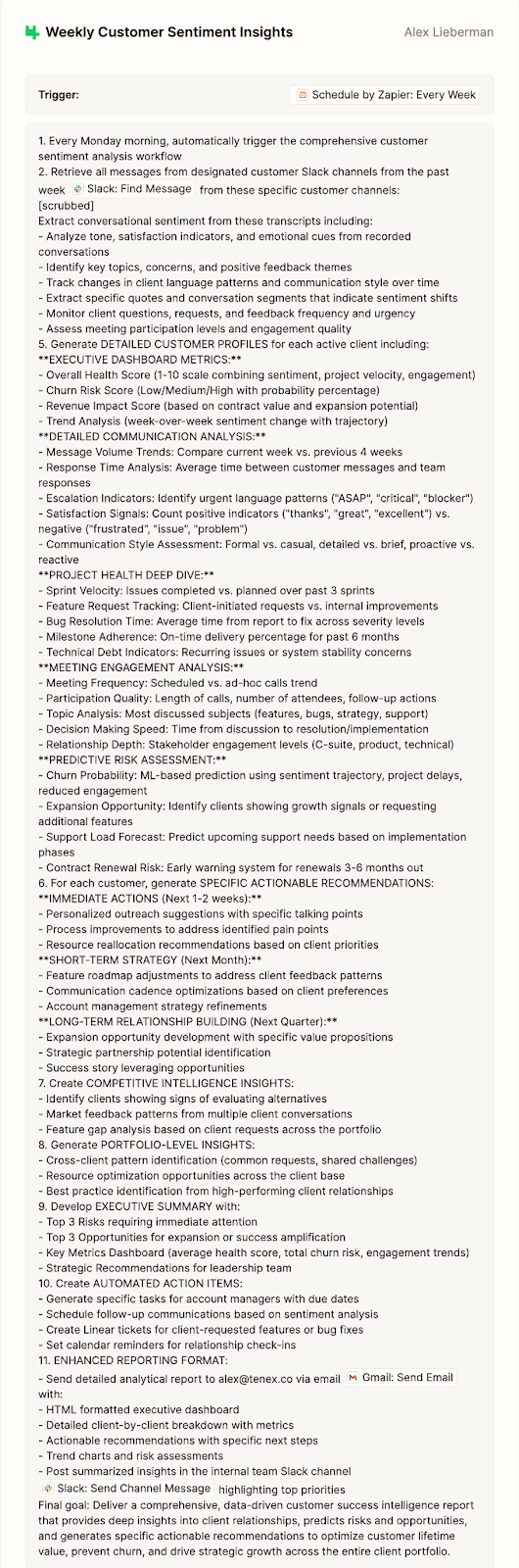
Step 2: Move the prompt into Zapier. Zapier Agents can handle the wiring, scheduling, multi-system access, and delivery of this brief. 

First, create a new agent + paste the prompt you just wrote into it. From there:

  • Set a weekly schedule (Tenex runs it on Mondays at 8:00 AM)
  • Connect the data sources referenced in the prompt
  • Choose where the output is delivered (email and Slack)

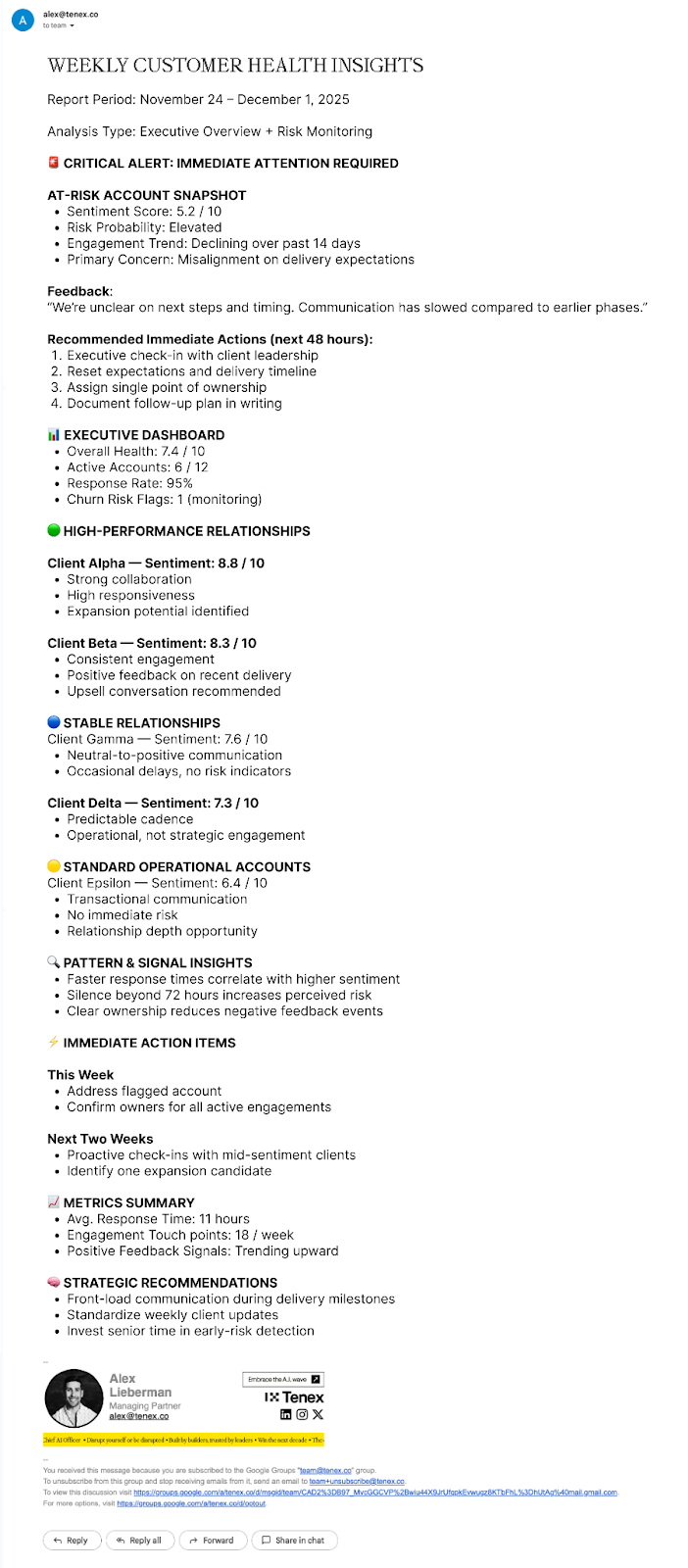
This is what your weekly insight email should look like. Take a closer look at ours

And the email you get should look like this:

Can I use Make, Lindy, n8n, or Gumloop instead of Zapier? 

Yes—you can build this workflow in a variety of tools. Most of them now have ChatGPT-like, easy-to-talk-to agent builders. But, truly, it’s the thought pattern that's the point:

You need scheduling, multi-system access, and reliable delivery. And Zapier lets a non-engineer build and maintain a workflow like this. The mistake Alex and Arman see people make is spending time switching tools instead of improving the prompt and the signal.

How do I create a churn risk score?

Start by treating it as a directional “how worried should we be?” signal, not a definitive answer. Alex’s ideal approach is to look back at customers who churned, identify the patterns that showed up beforehand, and use those signals as a baseline—but you can also give the model a simple points system, tell it to be conservative, or give it almost no guidance at all. 

Arman often prefers the last option early on, since it can surface risks you wouldn’t think to encode yourself. The score will be imperfect at first, and that’s fine—accept that your mileage will vary.

“I don’t just want a brief, though. I want it to actually do something." 
— Alex
Managing Partner, Tenex

03: Active AI

We’re in the endgame now. 

By now, you've got three ingredients:

  • A clear view of delivery (Step 01)
  • A weekly brief that surfaces risk and opportunity (Step 02)
  • A ranked list of accounts that deserve attention this week

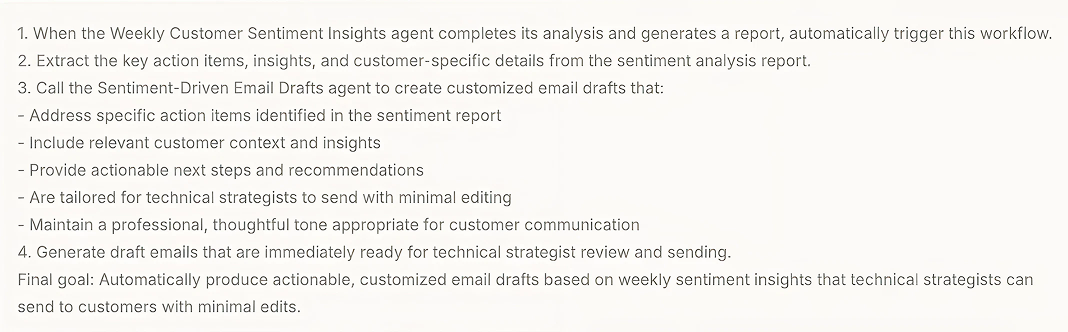
This system is the jump from insight to motion. Here, this system tees up ready-to-edit email drafts the moment the weekly brief lands.

Think of it as hospitality mise en place—prep everything before service starts so the customer experience feels effortless.

Build It

Step 1: Create a second Zapier Agent that triggers off the weekly insights report. Its only job: read the output of the weekly customer health report and turn each action item into an email draft saved in Gmail.

Human-Verified Prompt

We have a **Weekly Customer Sentiment Insights** agent. Each time this agent runs, trigger a second agent that turns insights into ready-to-send email drafts. When the weekly report completes, the agent should: - retrieve all action items and customer-specific context from the report, and - generate one personalized email draft per action item. Each draft must include: - a professional subject line - a personalized greeting - brief context explaining why the outreach is happening - a clear, specific proposed action or next step - a direct call to action - a professional closing Drafts should be actionable, thoughtful, and specific—written so a technical strategist or account manager can send them with minimal edits. Save each draft to **Gmail** for review. Do not send messages automatically. The goal is to turn weekly customer insights into high-quality, ready-to-send outreach.

Copy

The output should look like this:

Step 2: Review, tweak, and send. Once it has access to the tool (Gmail, etc.), you’ll start your weeks with drafts already waiting—so your team spends time on judgment and tone, not blank-page writing.

A few examples of what this unlocks:

  • A stalled delivery gets a proactive "here's what we're doing next" note before the client asks.
  • A quiet account gets a check-in framed around recent progress instead of "just checking in."
  • A high-risk client gets a clear plan and next step, not a vague reassurance.

This is where Danny Meyer's hospitality idea comes back: the agent does the prep, but the human does the care. Adjust tone per account, make it specific, and keep it unmistakably yours. 

Once dialed, click send, and watch your clients level out to lower churn risks. 

The Takeaway

These three levels of AI are the lowest common denominator for maintaining a real pulse on your clients as you scale. Start with delivery truth (Reactive). Put it on a clock so you get a weekly brief before issues compound (Proactive). Then turn that brief into drafts a human can review, tweak, and send (Active).

That’s the Danny Meyer move. AI handles the prep, so your team can focus on hospitality: judgment, tone, accountability. Care stays human—AI makes it easier to show up consistently.

Keep refining the system with better prompts, clearer signals, and tighter loops. The leverage isn’t more dashboards or more headcount. It’s fewer surprises—and a faster, calmer recovery when something starts to drift.

Hire Us As Your Chief AI Officer

We have the muscle—and the reps. Want us to run this exact playbook inside your org? Talk to us today.

Built by builders, trusted by leaders

Stay on the right side 
of history.

Get Started