
Hand-testing a few prompts won't tell you if an agent is ready to ship. Learn the building blocks every eval platform shares, and a five-step loop for turning production failures into tests that keep them from coming back.
You can vibe-code your way to an app that is capable, but you can’t vibe-test and call it a day. Tweaking prompts and trying a few inputs by hand only gets you so far; evals are what get your agents ready for deployment and keep them working once they’re live.
Teams often ask which eval tool to use, and there are plenty of useful ones: Langfuse, Braintrust, and LangSmith, to name a few. But no tool can tell you what your agent should do; you have to define that for yourself.
This is eval-driven development: define what good behavior looks like, test the agent against it, and improve it until it passes. Every important failure should become a regression test: a case you rerun after every change, so you’ll know if the failure ever comes back.
Below, we’ll lay out the four building blocks every eval tool shares, then put them into a five-step process you can use when developing new behavior or fixing failures found in production.
New to evals, or not building agents yourself? Start with our field guide, Due Diligence: Your First Agent Eval.
What is an eval?
An eval is a grader applied to a trace.
A grader (also called an evaluator or scorer) is anything that scores how well the agent did, from a simple code check to an LLM acting as a judge. A trace is the full record of one agent run: the input, every step it took, and the output.
For example, a customer asks “Where is my refund?” The agent calls search_orders, then issue_refund, and replies “Refund sent, 3–5 days.” Here’s that run as a trace:
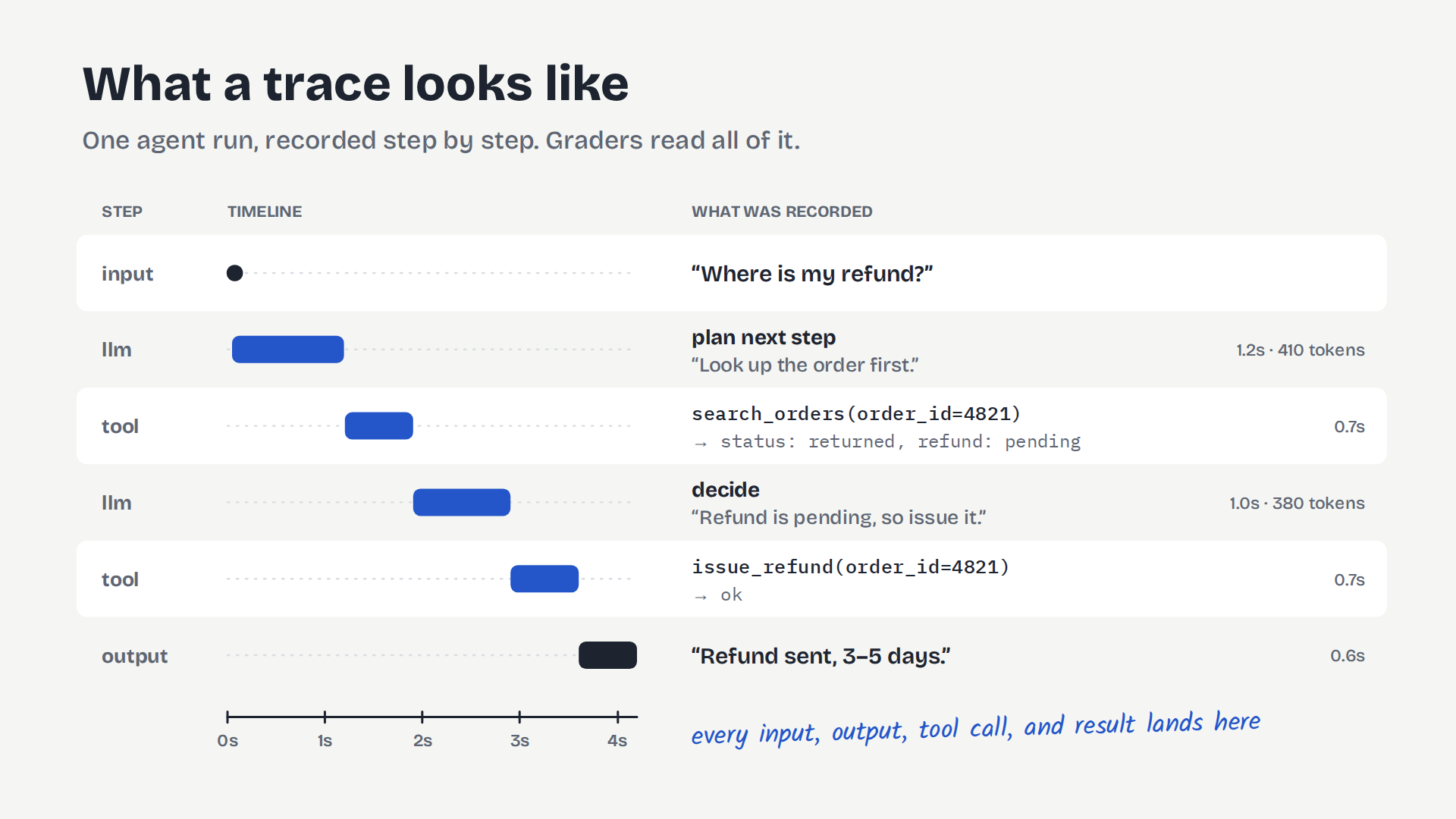
It’s very difficult to run evals without tracing, so if you don’t have observability set up yet, start there.
Everything else is plumbing for getting a trace in front of a grader and doing something useful with the score:
Case (also called a dataset item, example, or test case). It includes an input you want to test, plus a definition of what “good” looks like for it. Cases live in a dataset. Some cases carry a reference answer. Others just specify which graders should be applied after the case runs.
Example: the input “Where is my refund?” from a customer whose order #4821 has a pending refund, with the expected reply “Your refund for order #4821 has been issued and should arrive in 3–5 business days.”
Run (also called an experiment). Every case in a dataset, executed against one specific version of your prompt or agent. Each case produces a trace, and each trace gets graded. A run is a snapshot: “version X scored Y on dataset Z.” Compare runs to learn whether a change to your agent actually helped.
Example: all 40 cases in your refunds dataset, run against the current agent. If v3 passes 36 of 40 and a prompt change gets v4 to 39, the change helped, and you can see exactly which case still fails.
Four ways to grade an agent
Graders come in a few families, and most real setups run several on the same trace. Here’s how each one would grade the refund trace from earlier.
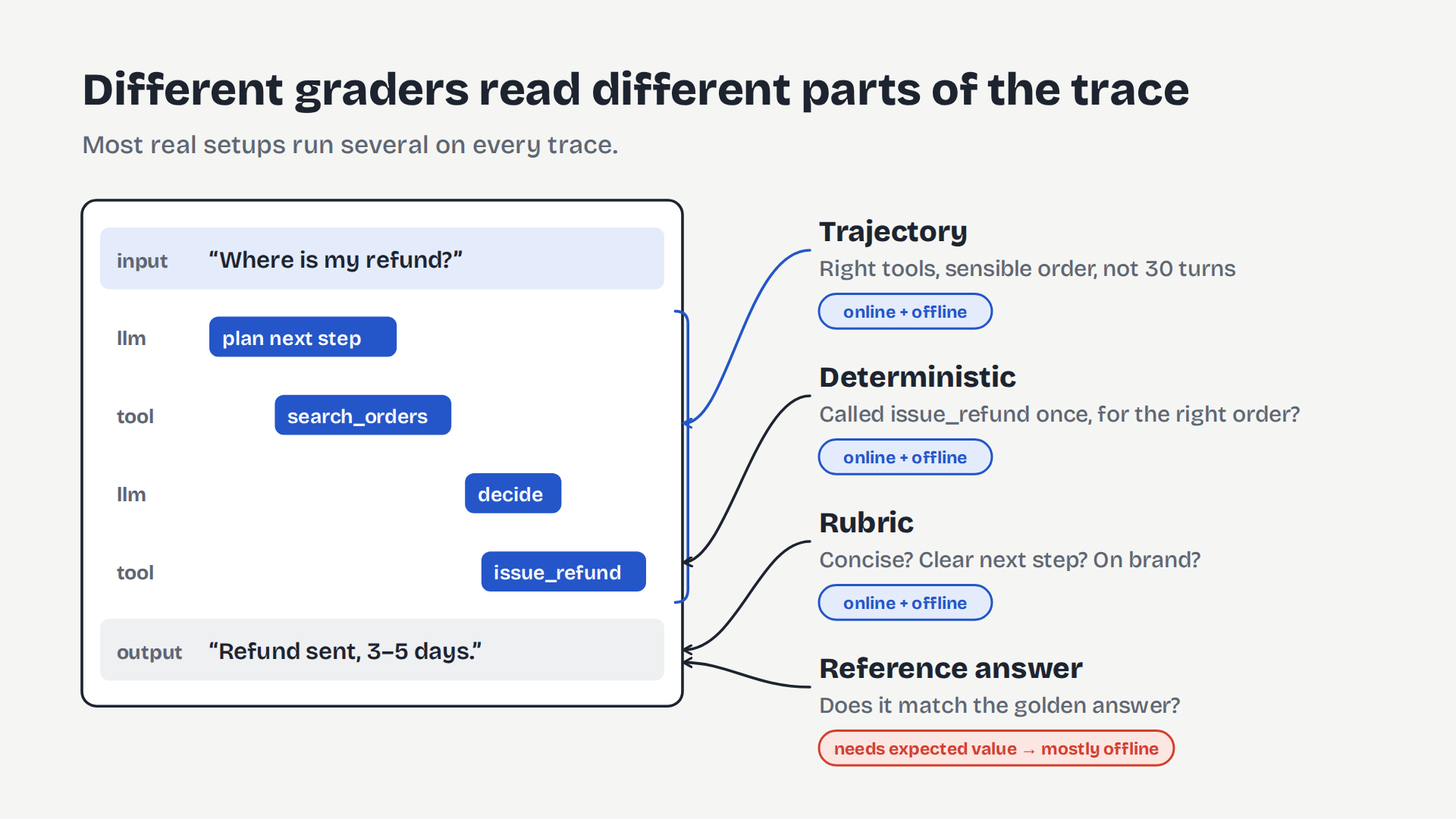
- Deterministic checks. Plain code, no model involved. Did the agent call
issue_refundexactly once, with the same order ID it looked up? A double refund or a refund on the wrong order fails instantly. They’re cheap, fast, and unambiguous, so use them wherever you can. - Reference-answer graders. Compare the output to a reference answer stored on the case, by exact match or with an LLM judge checking whether the meaning matches. The case stores “Your refund for order #4821 has been issued and should arrive in 3–5 business days,” and a judge checks that “Refund sent, 3–5 days” means the same thing. They need a reference answer written in advance, and live traffic doesn’t come with one, so they mostly run on test cases you wrote.
- Rubric graders (style, tone, diagnostics). An LLM judge scores the output against criteria, with no reference answer needed. Is the reply concise? Does it confirm what happened? Does it tell the user what to do if the refund doesn’t show up? That last one would actually flag our example, which is the point: a rubric can catch problems a reference answer misses. Since they don’t need a reference answer, they work on any trace, including production ones.
- Trajectory graders. These grade the steps the agent took, not just its final answer. Did it look up the order before issuing the refund? A run that calls
issue_refundwithout checking the order first, or callssearch_orderstwelve times, fails even if the final reply reads perfectly. They’re slower and more expensive to run, and the grader itself has more ways to go wrong.
LLM judges need checking too. A judge is just another prompt, and it can be wrong. Before you trust the rubric judge above, have a teammate label a few dozen refund replies as pass or fail and measure how often the judge agrees. If agreement is low, fix the judge’s rubric before its scores drive any decisions, and recheck whenever you change the judge.
What’s the difference between online and offline evals?
The main difference is where the trace that you’re grading comes from.
- Online: a real user or system has already used your agent in production, so the trace already exists and you just grade it.
- Offline: nobody has run this scenario yet, so you need a test case to trigger a run that produces the trace, and then you grade it.
The trace looks the same either way. Most of the other differences, like which graders you can use or how much you can control, follow from where it came from.
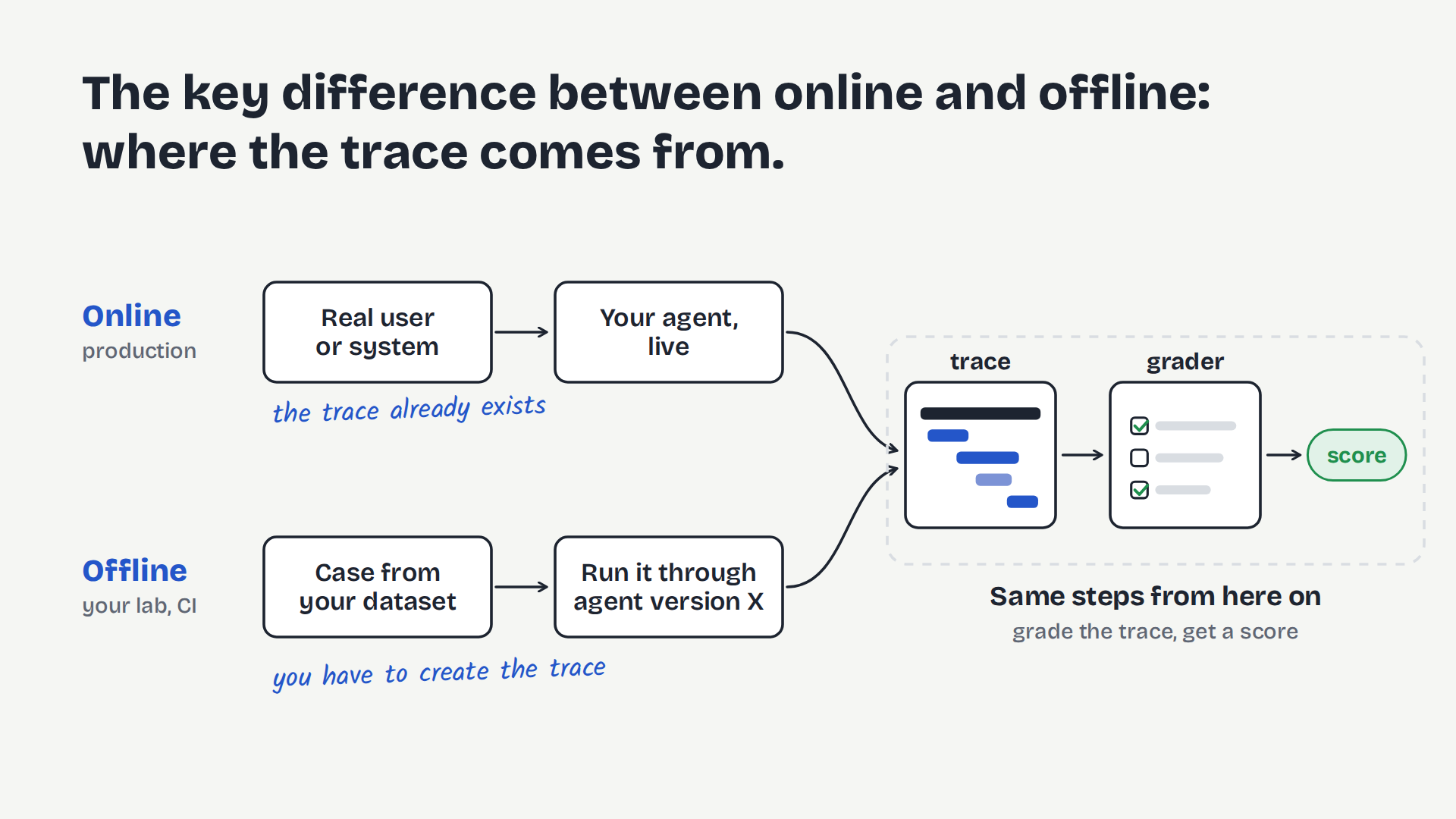
Online evals watch production. Graders run automatically on real traces, often a sample to keep LLM-judge costs down, and their job is to surface bad behavior. Production usually doesn’t come with reference answers, so online grading relies on deterministic checks, rubrics, trajectory graders, and user signals like thumbs-downs or retries.
Offline evals run in your lab: on demand or in CI, before anything ships. Their job is to test expected behavior and let you iterate on fixes safely. You are the domain expert who wrote the cases, so you can attach reference answers.
You need both. Online without offline means you can see problems but can’t fix them safely. Offline without online means you’re testing the scenarios you imagined, not the ones your users actually create.
What connects the two is promotion, turning a bad production trace into an offline case.
What is eval-driven development?
Eval-driven development is test-driven development for agent behavior. Before you touch a prompt, an instruction, or a skill definition, you write down what “correct” means, and then you run the agent, iterating on it until the agent performs correctly.
Cases and “correct” come into the loop from one of two places:
- Proactive: you define a behavior before you build it. This is also how you get started before you have any production traffic: write cases for the behavior you want, and for the behavior you believe you already have.
- Example: when a customer asks about a pending refund, the agent should look up the order, issue the refund, and tell the customer when to expect it.
- Reactive: online graders or a user flag a bad trace in production, and you promote it into a case.
- Example: a real customer asked where their refund was, and the agent said it couldn’t help. You promote that trace into a case with the same input and define the correct behavior: look up the order, issue the refund, and tell the customer when to expect it.
Either way, you end up with a behavior you need to define. From there, the loop is the same.
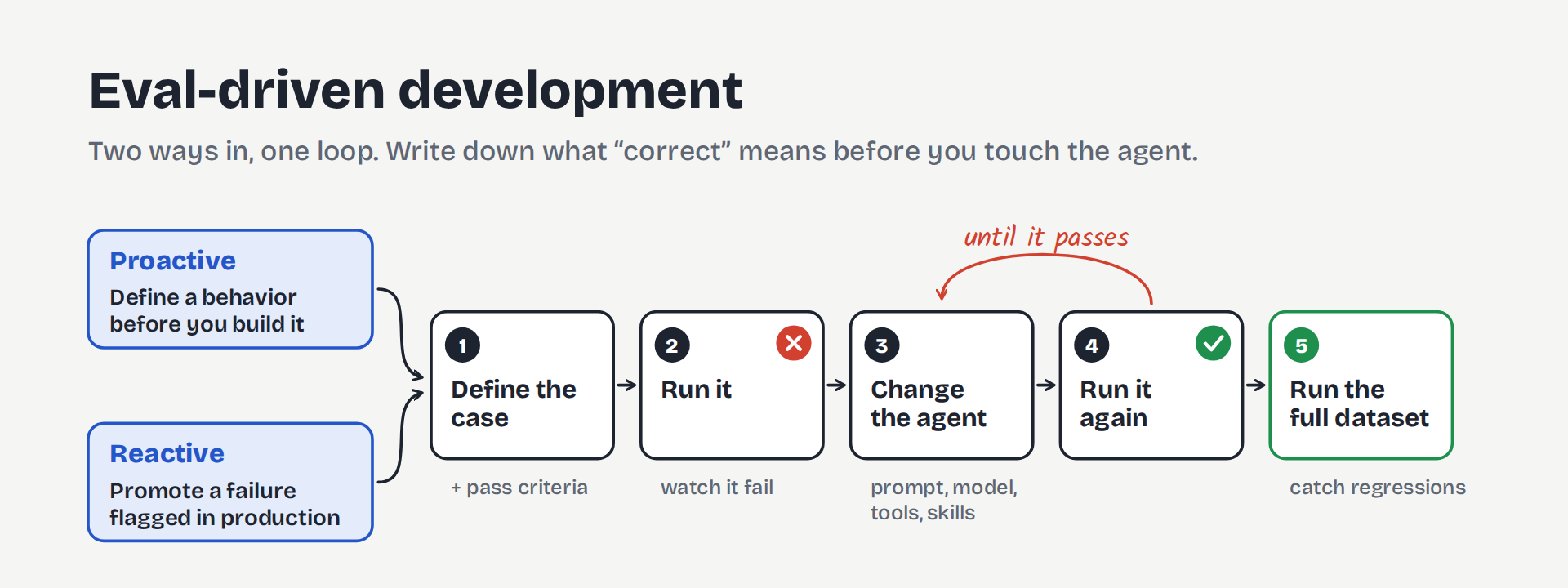
- Define the case and its pass criteria. Write the input and attach graders. A reference-answer grader needs a reference answer; a rubric grader just needs its criteria.
- Run it and watch it fail. If it passes before you’ve changed anything, either the behavior already works or the case isn’t testing what you think. For a promoted trace, this step also confirms you can reproduce the failure offline.
- Change the agent. Prompt, model, instructions, tool descriptions, skills.
- Run it again. Repeat steps 3 and 4 until it passes.
- Run the full dataset, not just this case, to catch regressions.
Decide up front what counts as a pass. The same input can pass once and fail the next time (thanks, non-deterministic LLMs!), so one green check doesn’t prove much. Run each case several times (k) and set the bar explicitly: all-of-k for high-stakes behavior where a single failure is unacceptable, like issuing a refund on someone else’s order (passing k of k doesn’t prove it can’t happen, but failing once proves it can), or n-of-k, like 2 of 3, where some variance is acceptable.
Turning a production failure into a case
Promotion is the bridge between online and offline. Pull up the flagged trace (without tracing and online evals it will be hard to catch these!) and copy its input into a new case. Then write down what good looks like. The bad output obviously isn’t your reference answer, so someone has to supply the right one.
Promoted traces are real user data, so scrub anything sensitive before it lands in a dataset your whole team can read.
Making cases easy to write
Each eval system or provider has a different way of creating cases and datasets: JSON, CSV, through a UI, etc. Do yourself and your team a favor and create a skill that easily creates cases for you based on natural language. You should be able to say any of the following to Claude or Codex and get back the provider-specific dataset format:
- “Create a case for when a customer asks for a refund on an order older than 90 days. The agent should explain the refund window and should not call
issue_refund.” (Proactive case) - “Create a case from production trace:
{flagged_trace_id}. The agent said it couldn’t help; it should have looked up the order, issued the refund, and told the customer when to expect it.” (Reactive case)
Building a regression suite
Step 5 of the eval-driven development loop says to run the full dataset because a prompt change that fixes one case can quietly break others. If you only rerun the case you’re fixing, you won’t see it.
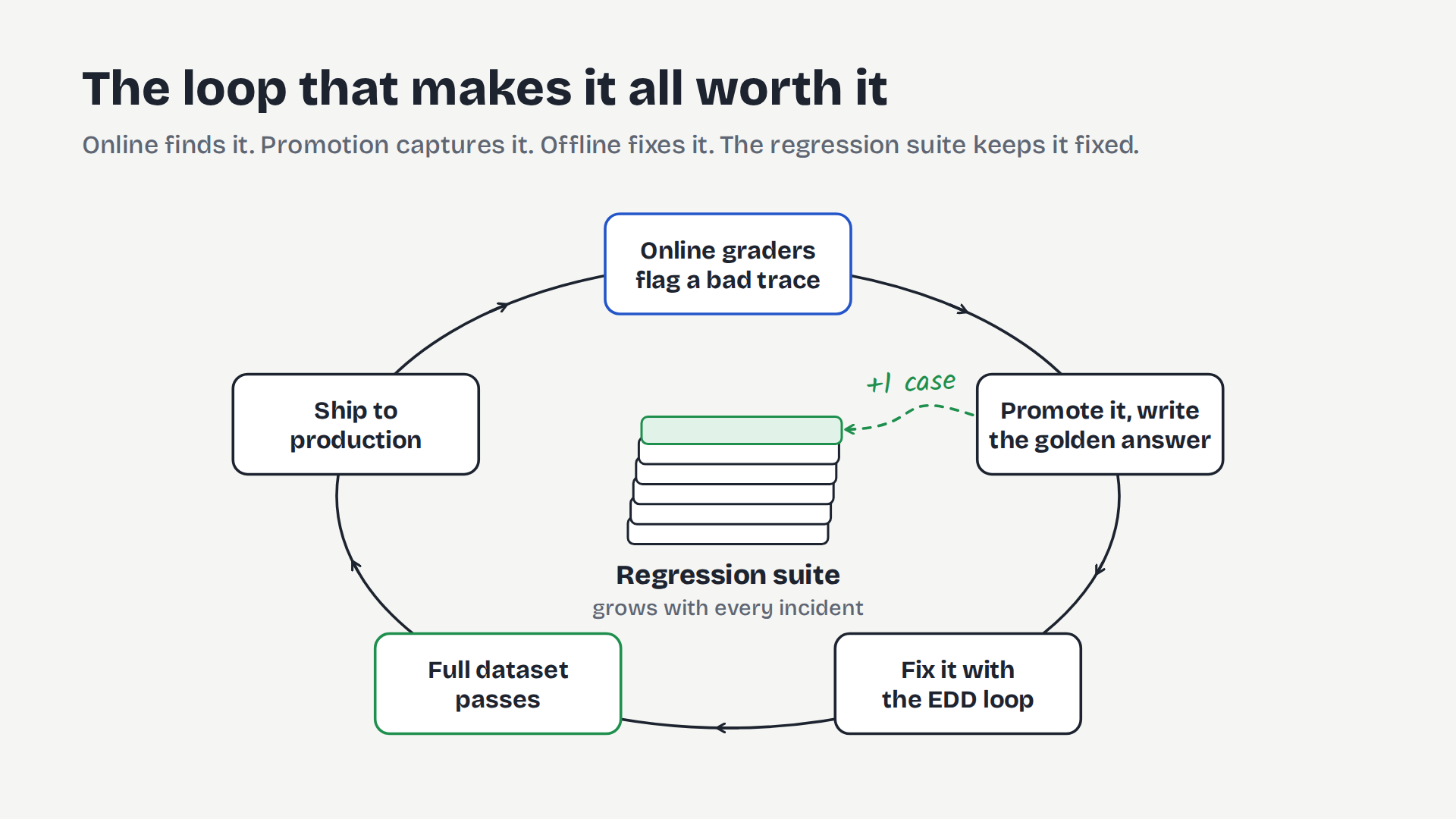
Run the whole dataset on every meaningful change, ideally in CI, and compare it to the last run. Over time, every production incident you promote becomes a permanent test. Your dataset turns into a record of the ways your agent has failed, and a check that catches those failures if they come back.
Put together, online evals find a problem, promotion turns it into a case, the loop fixes it offline, and the growing dataset makes sure it stays fixed.
What a team starting out needs to know
- Deciding what good looks like is the real work. Start by writing down expected behavior before you build, including behavior you think already works. When you do, you’ll often find some of it doesn’t.
- Make creating cases almost effortless. If turning a production failure into a case means several screens and hand-written JSON, people will skip it and your dataset will stop growing. Give your team one click to promote a trace, one box to write the expected behavior, and a case-writing skill like the one above.
- Grade the path early. An agent that takes 30 turns to do what one well-chosen tool call could do may still give a perfect answer, and an output-only grader will never flag it. Add at least one trajectory check from the start.
A glance at four major platforms
With this model in mind, the major platforms look a lot more alike. They’re building the same blocks under different names:
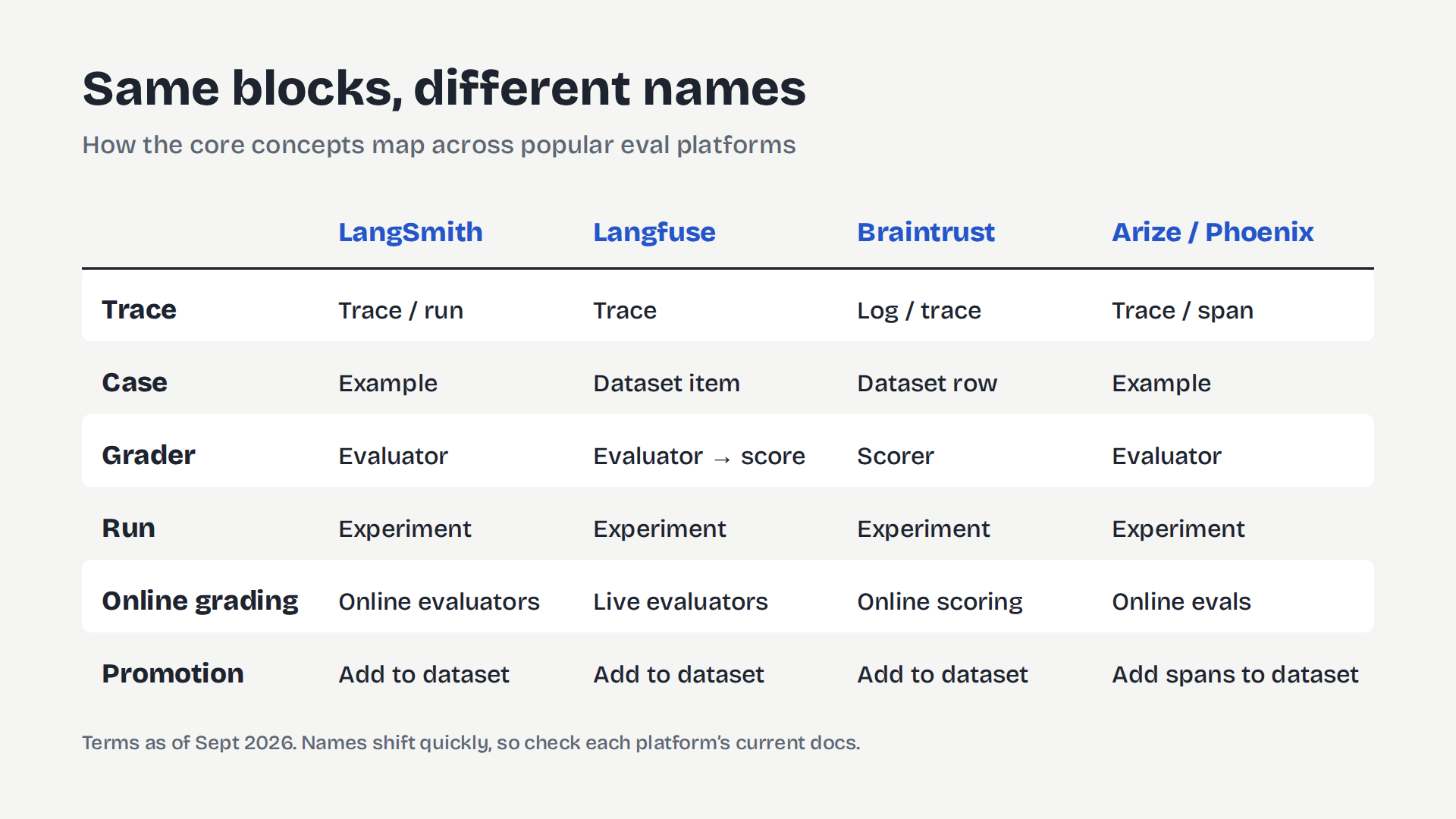
- LangSmith: cases are examples, graders are evaluators, runs are experiments. Online evaluators run on production traces through rules, and failing traces can be added straight to a dataset.
- Langfuse: cases are dataset items, grader results are scores, runs are experiments (formerly dataset runs). LLM-as-a-judge evaluators can score live traces, and production traces can be added to a dataset directly.
- Braintrust: cases are records, graders are scorers, runs are experiments, production traces are logs. Online scoring rules grade logs with sampling and filters, and logged traces can be promoted straight into a dataset.
- Arize (AX and open-source Phoenix): cases are examples, graders are evaluators, runs are experiments. Production spans can be added to datasets directly.
All of them support promotion in some form, because the path from production back to your dataset is the core of any eval setup.
Names shift fast in this space, so check each tool’s current docs before you commit.
Coming next: when you can’t recreate a trace
This whole model assumes you can recreate a trace offline. For a simple prompt, you can: copy the input into a case and run it. For an agent that reads from or writes to real systems, you often can’t. That’s where eval setups for real-world agents get hard, and it’s what the next two parts of this series cover.
Part 2: Replaying the state of the world. Your agent’s behavior depends on what its tools returned at that moment. When the refund trace ran, search_orders said order #4821’s refund was pending. Rerun the same input a week later and the refund has already gone through, so the agent takes a different path, and the trace you promoted can’t be reproduced.
Part 3: Intercepting writes in offline runs. issue_refund moves real money. You want to grade how well your agent handles refunds offline, without refunding real orders every time CI runs.
Subscribe to Ultrathink to get Parts 2 and 3 when they go live, or check back on the blog.
Common questions
Questions leaders ask us
What is an AI agent eval?
An eval is a grader applied to a trace. A trace is the full record of one agent run: the input, every step the agent took, and the output. A grader (also called an evaluator or scorer) is anything that scores how well the agent did, from a simple code check to an LLM acting as a judge.
What's the difference between online and offline evals?
Where the trace comes from. Online evals grade traces that real users already created in production, so they surface bad behavior. Offline evals use test cases you wrote to trigger new runs, on demand or in CI, so you can test expected behavior and iterate on fixes safely before anything ships. You need both.
What is eval-driven development?
Test-driven development for agent behavior. Before you change a prompt, instruction, or skill, you write down what correct means as a case with graders, run it and watch it fail, change the agent until it passes, and then run the full dataset to catch regressions.
What are the main types of graders for AI agents?
Deterministic checks (plain code, no model), reference-answer graders (compare the output to a stored answer), rubric graders (an LLM judge scores the output against criteria), and trajectory graders (grade the steps the agent took, not just its final answer). Most real setups run several on the same trace.
How do you turn a production failure into an eval case?
Promote it: copy the flagged trace's input into a new case, then write down what good looks like, since the bad output can't be your reference answer. Scrub any sensitive user data before it lands in a shared dataset. Once promoted, the case runs with the rest of your regression suite on every change.